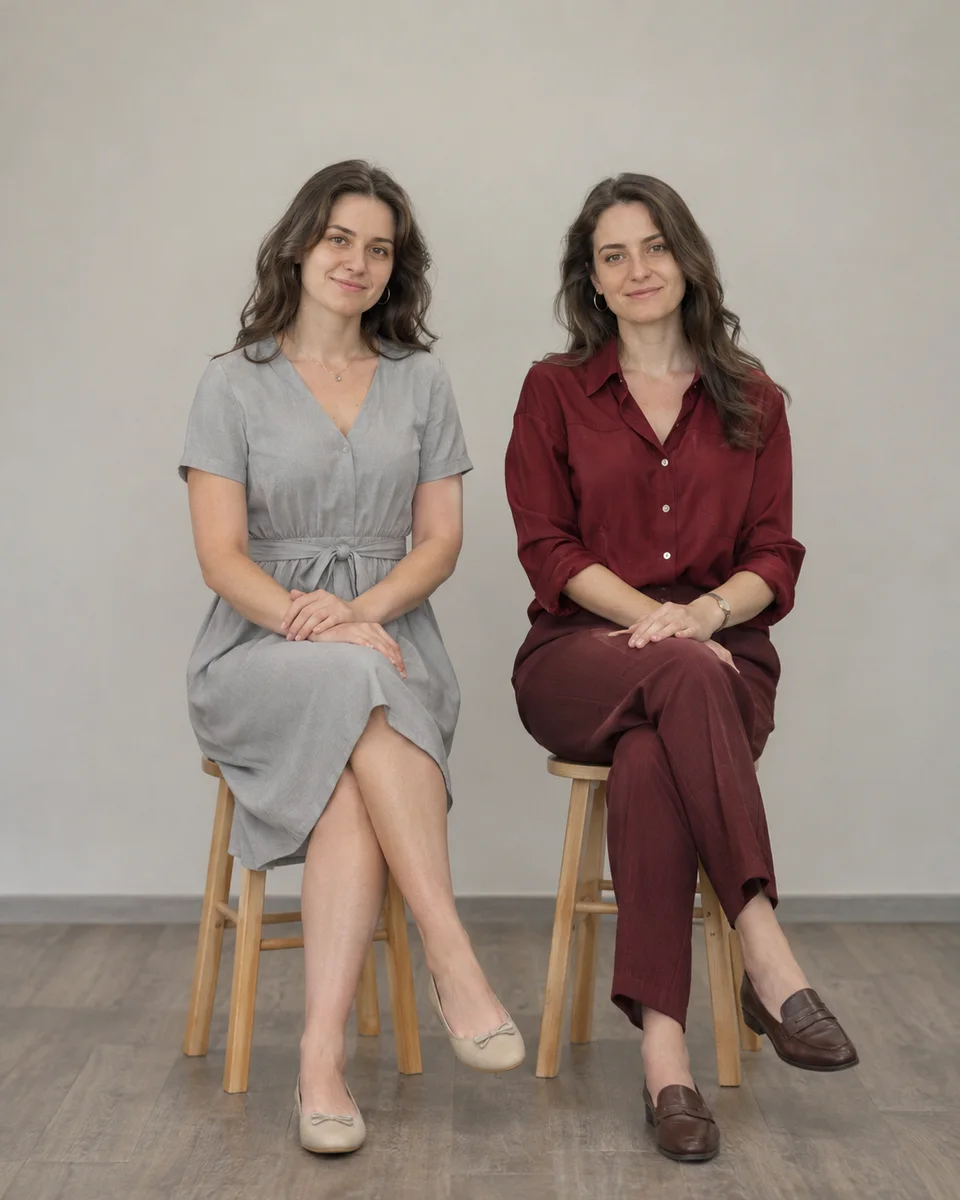
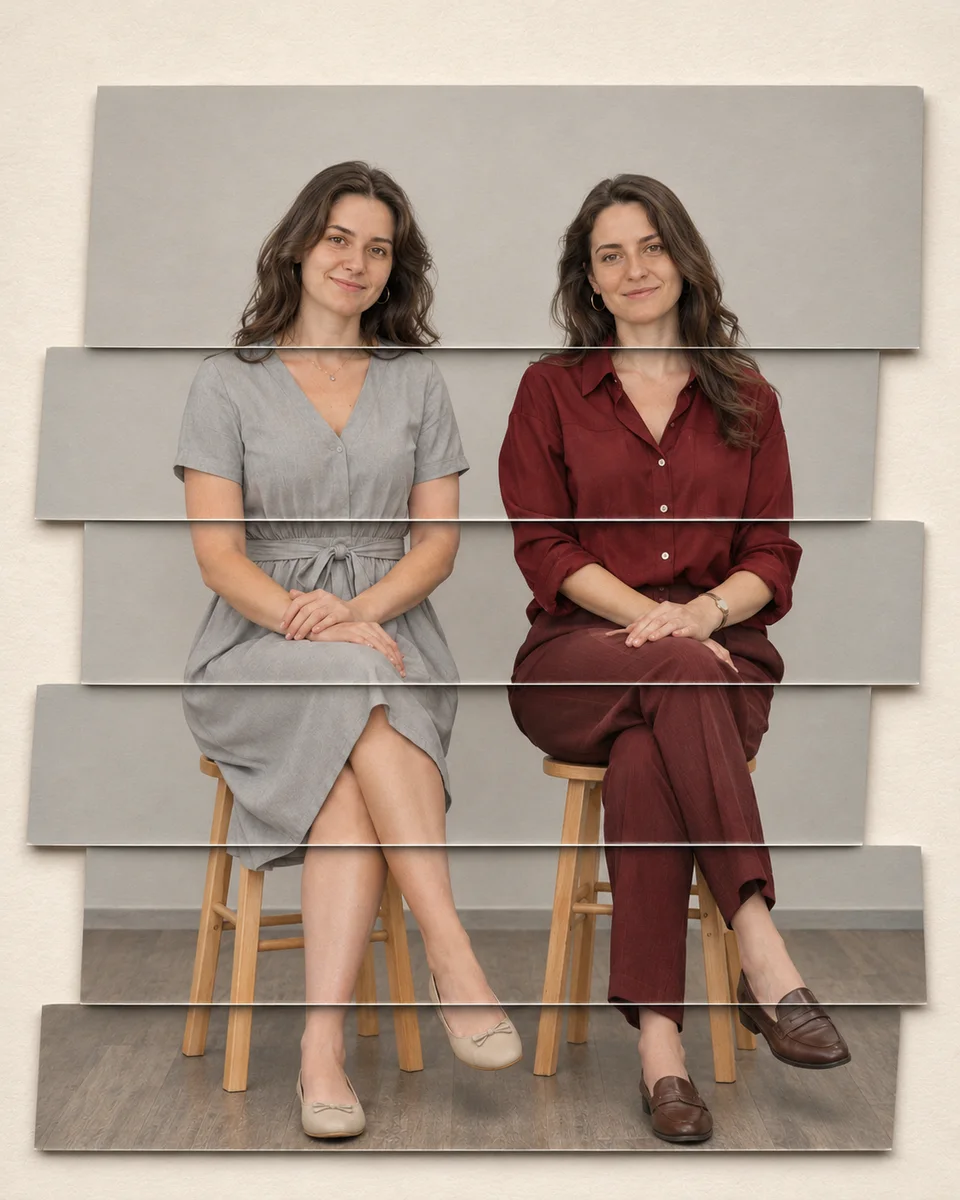
계단식 사진 리본 · Staggered Photo Ribbons
사진 속 인물을 계단식 사진 리본 합성 사진으로 변환합니다. 넓은 사진 리본이 제한된 종이 공간에서 약간씩 어긋나며, 인물 간의 연결은 여전히 식별 가능합니다. 개인의 정체성과 주요 공간 관계를 보존합니다.
A group photograph cut into offset horizontal image ribbons on restrained paper space. Offset a few wide source-photo ribbons by small amounts while keeping complete faces, body connections and overall group order readable.
본 방법은 VigoZhao의 MIT 라이선스 설명을 각색한 것입니다. 원저작자, 출처 및 변경 사항은 provenance.json에서 확인할 수 있으며, 전체 상류 라이선스 및 저작권 표시는 LICENSE-THIRD-PARTY.txt에 보존되어 있습니다.
Adapted from VigoZhao's MIT-licensed instructions. provenance.json records the original author, pinned source and modifications; LICENSE-THIRD-PARTY.txt retains the complete upstream license and copyright notices.
원저작자 · Original attribution: Copyright (c) 2026 VigoZhao Adapted by MuziGeek from VigoZhao; original-post attribution is retained where the collection provides it.
입력 분석 및 실제 보존
- 사용자가 제공한 원본 이미지를 검사합니다. 사용 가능한 이미지가 없으면 먼저 이미지를 요청합니다. 이 저장소의 예제를 사용자 입력으로 대체하지 마십시오.
- 원본 이미지의 피사체, 정체성, 인원 수, 연결 상태, 가려짐, 조명 및 구도를 관찰합니다. 이 스킬의 보존 제약 조건과 기하학적 경계에 따라 보존해야 할 속성과 명시적으로 허용된 변환을 구분합니다. 샘플 설명은 사용자 입력에 대한 사실이 아닙니다.
- 참조 이미지 편집이 가능한 도구를 사용합니다. 관찰된 사실과 recipe.yaml의 순서화된 메커니즘을 결합합니다. recipe.yaml의 모델 계열 레이블은 설치 스크립트가 필요하지 않습니다.
- 기본적으로 입력 비율을 유지합니다. 사용자가 명시적으로 요청하고 아래에 명시적으로 허용된 경우에만 구도나 기하학적 구조를 변경합니다. 레시피의 4:5 비율은 카탈로그 샘플 기본값이며, 보호 대상을 자르는 권한이 아닙니다.
- 출력을 입력과 비교하고 발견된 오류를 수정합니다. 실제로 완료된 시각적 검사만 보고합니다. 강력한 스타일 적용이 신원이나 장면 무결성을 무시해서는 안 됩니다.
Input analysis and preservation
- Inspect the supplied image; request an image only when none is available. Never substitute a repository example for the user's input.
- Inspect the real subjects, identity, counts, attachments, overlaps, light and framing. Distinguish preserved attributes from explicitly permitted transformations using this Skill’s preservation and geometry rules; sample descriptions are not facts about user input.
- Use an available reference-image editing tool. Combine the observed facts with the ordered mechanisms in recipe.yaml; its model-family label does not require an installation script.
- Keep the input ratio by default; change composition or geometry only as requested by the user and expressly permitted below. The recipe’s 4:5 ratio is a catalog-sample default, not permission to crop protected subjects.
- Compare output with input and correct observed failures. Report only visual checks actually completed; stronger styling must not override identity or scene integrity.
스타일 메커니즘 · Style mechanism
- 사진 속 인물을 계단식 사진 리본 합성 사진으로 변환합니다. 넓은 사진 리본이 제한된 종이 공간에서 약간씩 어긋나며, 인물 간의 연결은 여전히 식별 가능합니다. 개인의 정체성과 주요 공간 관계를 보존합니다.
- 식별 특징: 넓은 사진 리본, 제한된 위치 오프셋, 얇은 종이 그림자.
- Medium anchor: A group photograph cut into offset horizontal image ribbons on restrained paper space.
- medium — A group photograph cut into offset horizontal image ribbons on restrained paper space.
- composition — Offset a few wide source-photo ribbons by small amounts while keeping complete faces, body connections and overall group order readable.
- texture — Use crisp cut edges and shallow paper shadows; no added duplicate heads or unrelated photographs.
- palette — Use a controlled palette appropriate to the requested medium; retain identifying source colors whenever the mechanism permits.
- lighting — Keep illumination internally consistent across the entire edited image, with contact shadows appropriate to the requested medium.
- detail — Retain source subject count, essential openings and connected anatomy; remove no identifying detail unless the permitted transformation requires it.
- finish — Deliver one finished image at the input aspect ratio, without comparison panels, new lettering, logos, watermarks or an external frame.
보존 제약 조건 · Preservation constraints
관찰된 콘텐츠에 다음 제약 조건을 적용합니다. 이 목록은 이미지에 없는 요소를 임의로 생성하는 것을 허용하지 않습니다.
Apply these constraints to observed content; they never authorize inventing absent subjects.
- 원본 피사체 수, 식별 가능한 정체성, 주요 포즈 및 연결된 신체 구조. 단, 명시적으로 허용된 변환의 경우는 예외입니다.
- 필수적인 개구부, 부착물 및 전경-배경 관계.
- 입력 프레임 내의 완전한 주요 피사체; 우발적인 잘림 없음.
적용 범위 및 기하학적 경계 · Applicability and geometry
- 적용 대상: 그룹 사진.
- Applies to: Group.
- 넓은 사진 리본 사이의 작은 오프셋을 허용합니다. 얼굴은 완전하게 유지하고 신체 연결과 그룹 순서를 읽을 수 있도록 유지합니다.
- Permit small offsets between wide photo ribbons; keep faces complete and retain readable body connections and group order.
- 위에서 명시적으로 허용되지 않은 구조적 변경은 이 방법의 범위를 벗어납니다. 이 방법을 특정 아티스트, 브랜드 또는 기존 작품을 복제하는 권한으로 해석하지 마십시오.
- Structural changes not explicitly allowed above are outside this method. This is not permission to reproduce a named artist, brand or existing artwork.
금지 사항 · Avoid
- Invented people, extra limbs, duplicate main subjects or disconnected anatomy.
- Unrequested logos, decorative writing, watermarks or fabricated technical claims.
- A generic filter that fails to implement the specified physical or optical mechanism.
승인 기준 · Acceptance
- 넓은 사진 리본이 제한적으로 어긋나 있으며 인물 간 연결이 여전히 식별 가능해야 합니다. Use crisp cut edges and shallow paper shadows; no added duplicate heads or unrelated photographs.
- 넓은 사진 리본 사이의 작은 오프셋을 허용합니다. 얼굴은 완전하게 유지하고 신체 연결과 그룹 순서를 읽을 수 있도록 유지합니다. Permit small offsets between wide photo ribbons; keep faces complete and retain readable body connections and group order.
- 피사체가 명확하게 식별 가능하고 연결이 자연스러워야 합니다. 효과는 특정 메커니즘을 가시적으로 구현해야 하며, 단순한 일반 필터가 아니어야 합니다. The subject remains legible with coherent connections; the requested physical or optical mechanism is visibly implemented.
- 관련 없는 텍스트, 브랜드, 테두리 또는 허구적인 측정 데이터 없이 완성된 이미지 하나만 제공합니다. Return one finished image without unrelated lettering, brands, frames or fabricated measurements.
레시피, 출처 및 라이선스 · Recipe, provenance and license
- recipe.yaml: structured image-editing recipe / 구조화된 이미지 편집 레시피.
- provenance.json: original authorship, method context and example status / 원저작자 정보, 방법 컨텍스트 및 예제 상태.
- LICENSE: MIT applies to MuziGeek's original contributions / MIT 라이선스는 MuziGeek의 독창적인 기여에 적용됩니다.
- LICENSE-THIRD-PARTY.txt: VigoZhao · MIT. Adapted material retains these terms and attribution / 각색된 자료는 이 조건과 저작자 표시를 유지합니다.
- 예제의 전/후 이미지는 AI로 생성된 것이며, 실제 인물 사진이나 실제 공예 제작 과정의 증거가 아닙니다. 결과는 모델과 입력에 따라 달라지며, 동일한 출력을 보장하지 않습니다.
- Example before/after images are AI-generated, not photographs of real people or evidence of physical craft production. Results vary by model and input.
- MIT 라이선스는 사용자 입력, 제3자 저작물, 초상권, 상표권 또는 생성 서비스 약관을 넘어서는 권리를 부여하지 않습니다. 예제 라이선스는 provenance.json에 별도로 기록됩니다.
- MIT grants no rights to user inputs, third-party works, likenesses or trademarks, and does not override generation-service terms; example terms are recorded separately in provenance.
예제 상태 · Example status
ready: 원본 이미지와 효과 이미지의 실제 생성 및 시각적 검토 기록이 완료되었습니다. COS 외부 링크 예제는 업로드 확인 증명을 별도로 보관하며, 저장소에 이미지 파일을 포함하지 않습니다.
ready: the source and effect have recorded real generation and approved visual reviews. COS-hosted examples also retain upload readback receipts; their image bytes are not bundled.
| AI 생성 원본 · Source | 승인된 효과 · Approved effect |
|---|---|