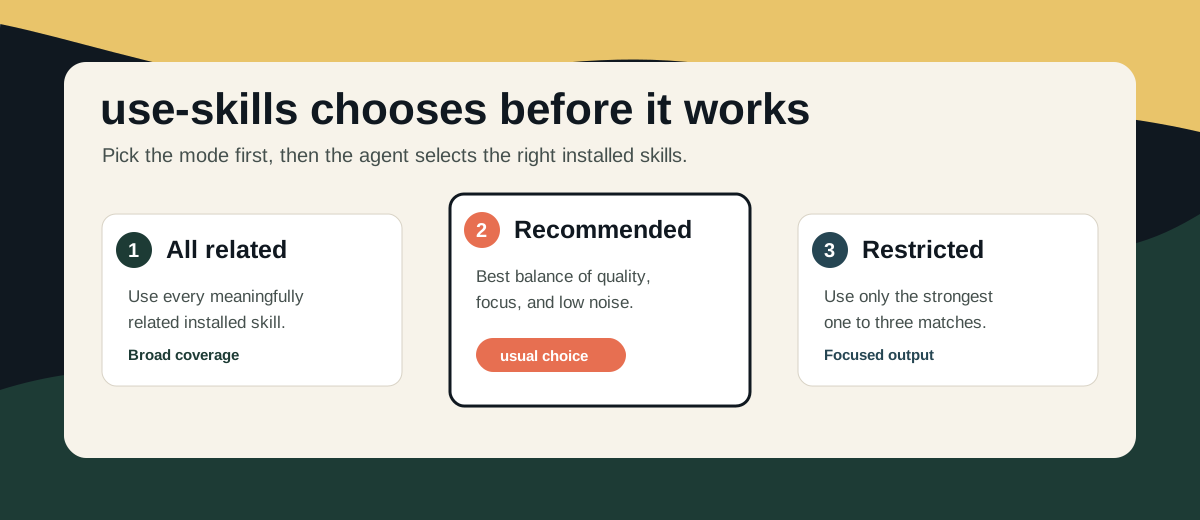


use-skills is a meta-skill that chooses which installed skills should help with a request.
Instead of writing prompts like use writing-plans, code-reviewer, testing, docs, and refactoring, you invoke $use-skills and let it recommend the right combination.
It is useful when a request spans more than one area, such as planning plus coding, review plus testing, writing plus structure, or documentation plus code changes.
At A Glance
- removes the need to manually mention every relevant skill
- reviews the available skill list for you
- asks the user to choose a mode before exploring when no prior mode applies
- shows likely skill candidates for each mode
- supports three modes:
All related,Recommended, andRestricted - starts with a short working-set block when used
- combines selected guidance into one coherent result
- stays unused when no skill is a strong match
Install
npx skills add https://github.com/CyrusSE/use-skills --global
Registry Compatibility
The canonical runtime skill file is skills/use-skills/SKILL.md.
This root skills/ layout works with registries that expect repository-scoped skill folders, such as skills.re, while still keeping the normal GitHub install flow working:
npx skills add https://github.com/CyrusSE/use-skills --global
Basic Use
$use-skills
Turn this feature request into an implementation plan with testing notes.
You do not need to know whether that should involve planning, review, testing, documentation, or another installed skill. use-skills handles that selection step.
The skill can also be selected automatically when the request is clearly multi-domain.
Why Use It
Without use-skills, users have to know the skill catalog and manually name the right combination.
With use-skills, the workflow becomes:
$use-skills
Patch this bug report with the most relevant skill guidance driving the fix.
Then choose a mode. The agent maps the prompt to the right working set and continues with the task.
This is especially useful when:
- you have many installed skills
- you are not sure which skill names fit the task
- a task needs several kinds of guidance at once
- you want the agent to explain the working set before it starts
Modes
When no previous mode applies, the skill asks before doing anything else. The prompt should be specific enough to help the user choose:
1. All related - use every available skill that is meaningfully related.
   Using: use-skills, brainstorming, writing-plans, humanizer, enhance-prompt
   For: broad coverage across fix strategy, report structure, prompt clarity, and wording

2. Recommended - use the best balanced working set.
   Using: use-skills, brainstorming, writing-plans
   For: strong output without unnecessary noise

3. Restricted - use only the strongest matches.
   Using: use-skills, brainstorming
   For: focused output with minimal skill involvement

Choose skill mode. Reply with 1, 2, or 3.
It should not inspect files, search the workspace, select skills, or infer a mode before asking.
It should not ask again if the task and expected output have not materially changed. Words like best, most relevant, and strongest do not count as explicit mode choices.
Terminal note: the mode menu uses a fenced text block because some agent CLIs collapse blank lines in normal list output.
Spacing rule: there must be one empty line between option blocks. If 2. Recommended appears directly below option 1's For: line, the menu is formatted wrong.
All related
Uses every available skill that is meaningfully related to the request.
This is best when the user explicitly wants broad skill coverage.
Recommended
Uses the best balanced working set for the request.
This is the usual choice for broad quality improvement.
Restricted
Uses only the strongest matches, usually one to three skills.
This is best when the user asks for focus or fewer skills.
Output Shape
When used, the response begins with:
Mode: All related | Recommended | RestrictedUsing: use-skills, <selected skill>For: <short purpose>
Then the agent continues with the answer, plan, patch, or recommendation.
Why The Mode Question Matters
The mode choice is intentionally asked before exploration. That avoids silently turning phrases like best, most relevant, or strongest into an assumed mode.
The user gets a clear choice:
1for broad coverage2for balanced recommendations3for focused selection
Good Fits
- replacing long prompts that manually name many skills
- planning a feature before implementation
- combining coding, testing, and review guidance
- improving a README or product spec
- reviewing a change with stronger structure
- choosing fewer skills for a focused answer
Poor Fits
- narrow tasks where one skill is enough
- requests that only need a direct command
- work where no installed skill adds clear value
Documentation Map
agents/openai.yaml: UI metadata for discovery surfaces that read skill interface fields- skills/use-skills/SKILL.md: runtime behavior
- REFERENCE.md: selection model
- examples/prompts.md: example prompts
Repository Structure
use-skills/
├── agents/
│   └── openai.yaml
├── assets/
│   └── use-skills-mode-picker.svg
├── examples/
│   └── prompts.md
├── skills/
│   └── use-skills/
│       └── SKILL.md
├── CONTRIBUTING.md
├── LICENSE
├── README.md
├── REFERENCE.md