電影感拖曳登陸頁面 — 黃金範本
建立一個高級的品牌感知登陸頁面,主視覺影片會隨著滑鼠移動而回應,頁面其餘部分則引導觀眾經歷一個5拍敘事弧。使用者提供一個影片,可選地提供標誌 + 產品圖片 + 品牌背景 — 此技能會處理調色盤提取、字體選擇、RTL/LTR、框架搭建、所有關鍵影格的影片重新編碼、滑鼠拖曳效果、章節庫和驗證。
為什麼有此技能
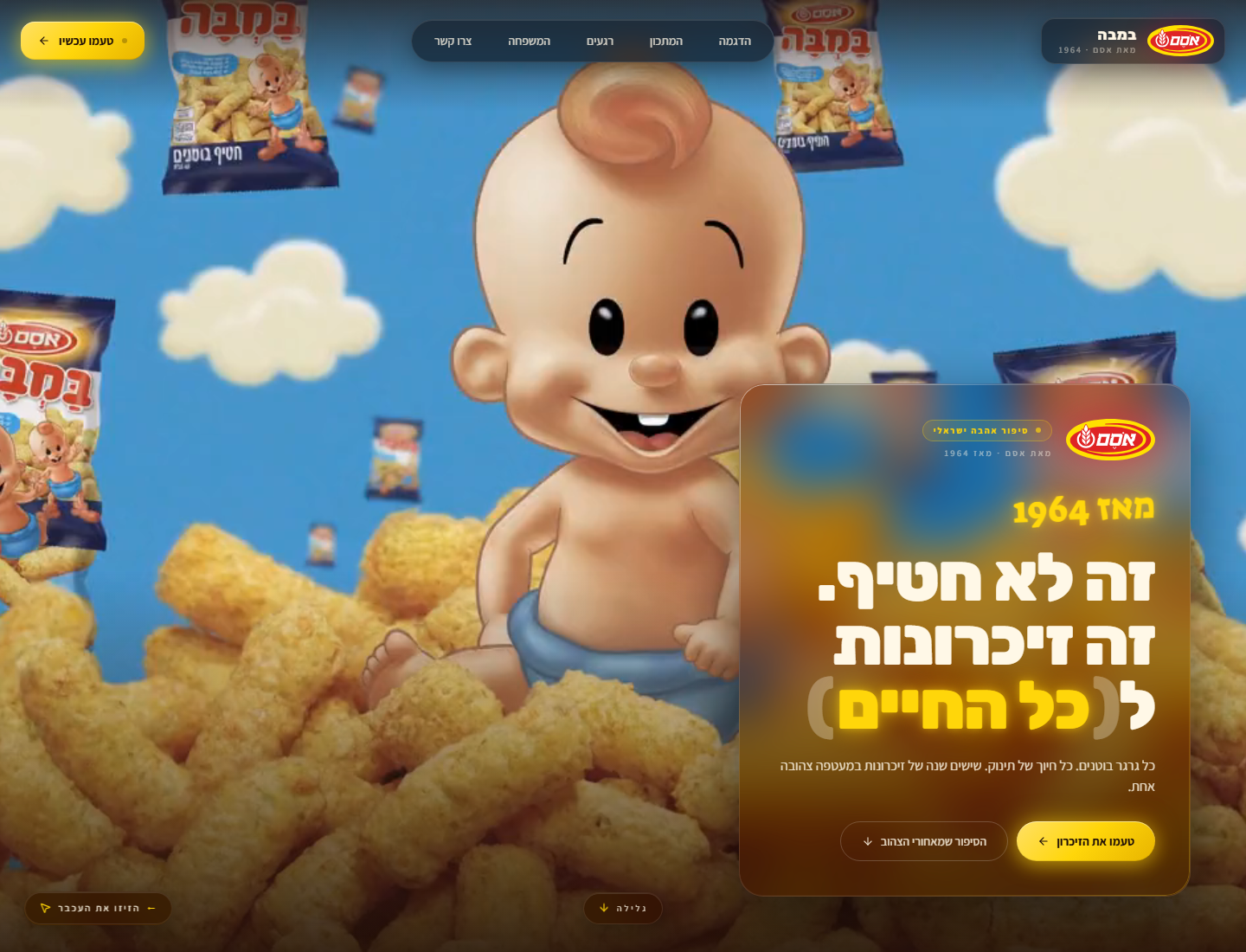
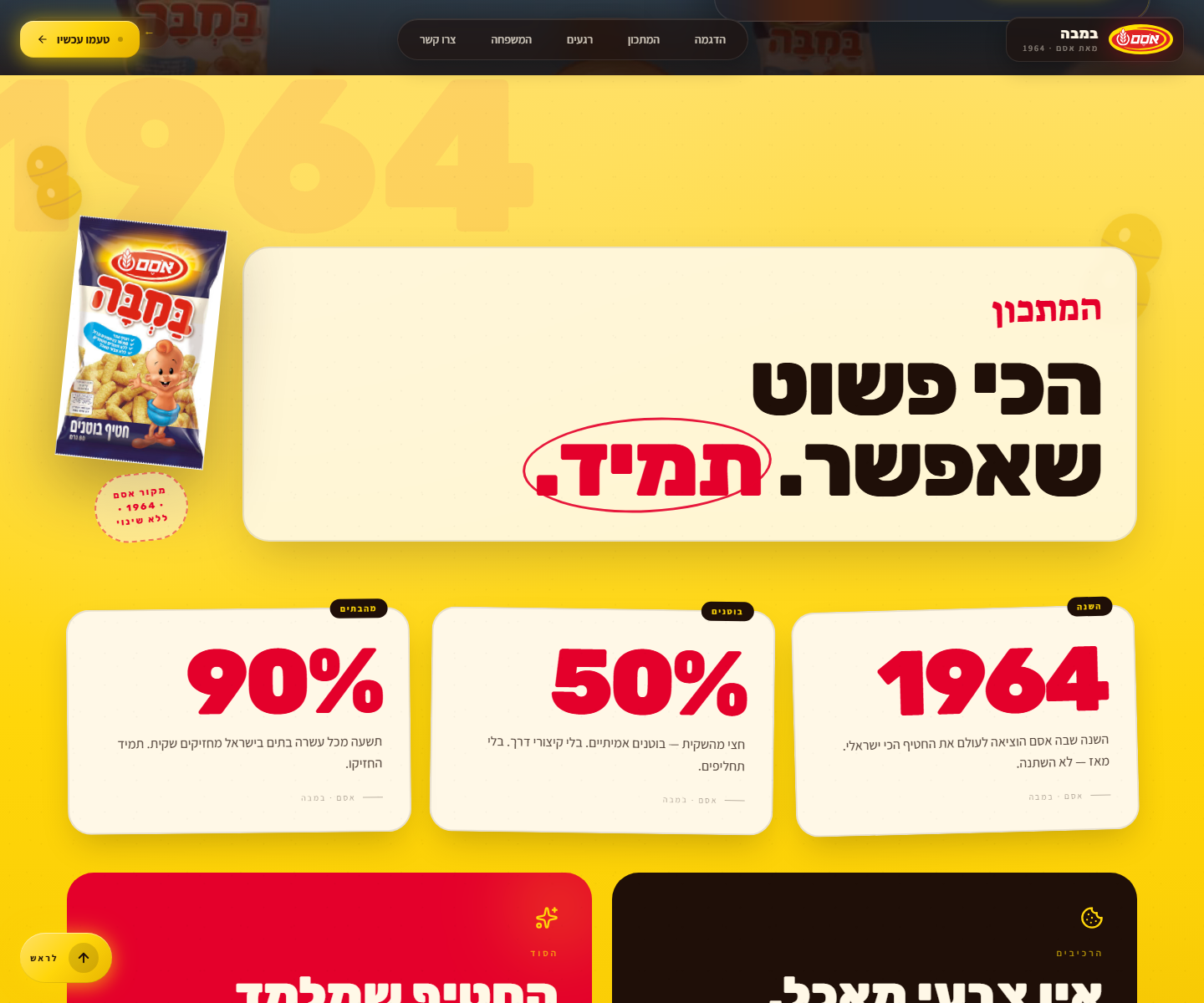
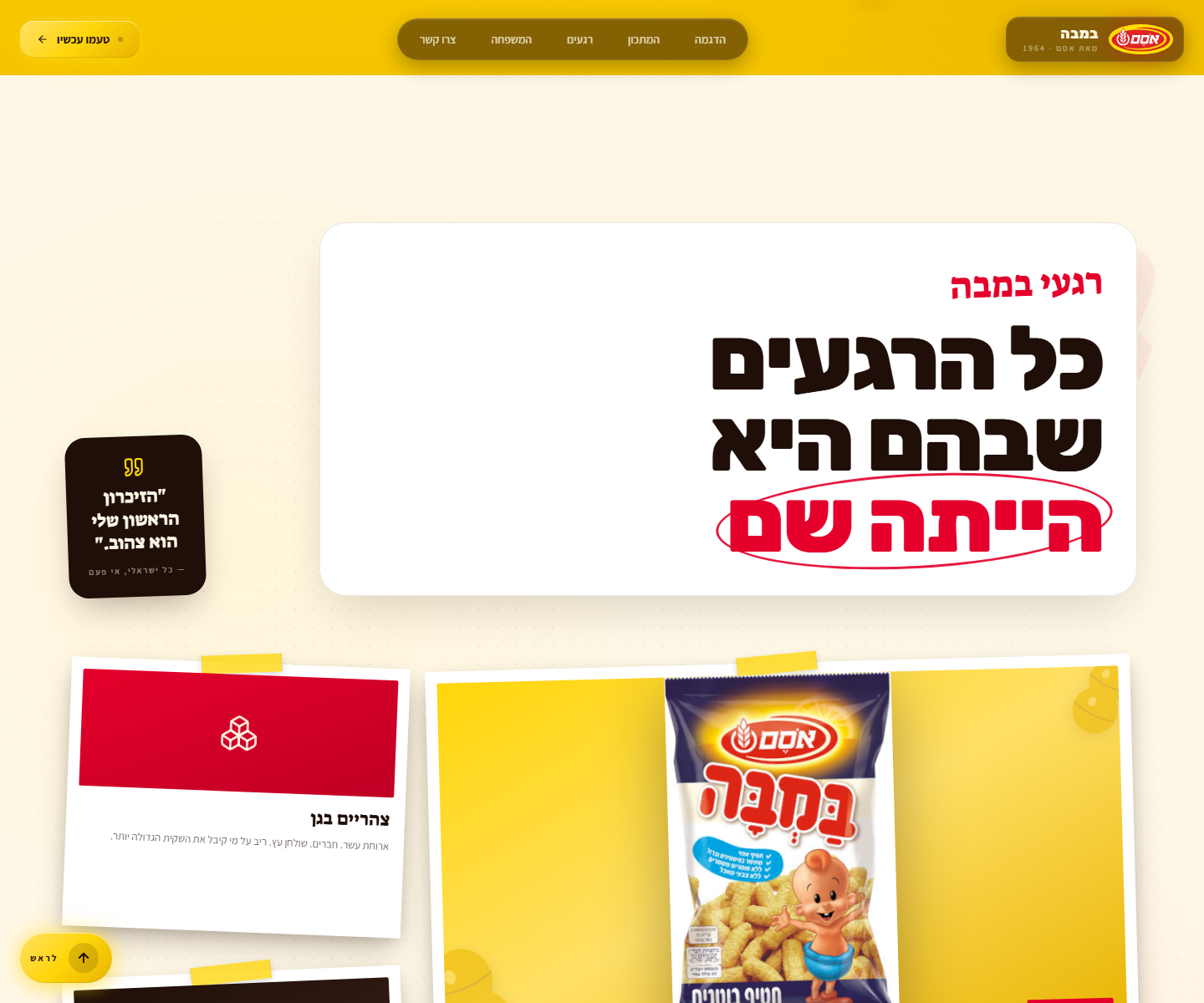
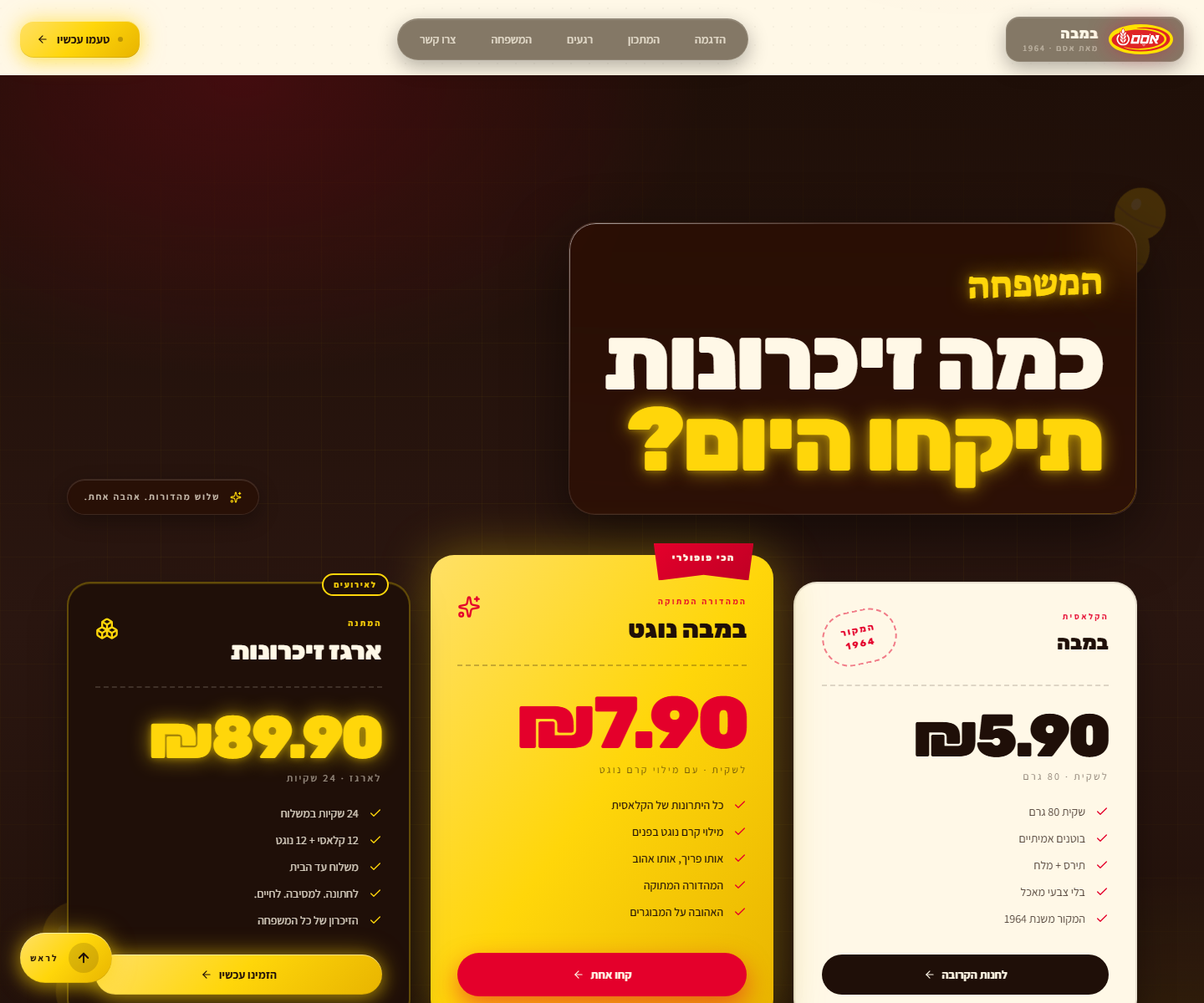
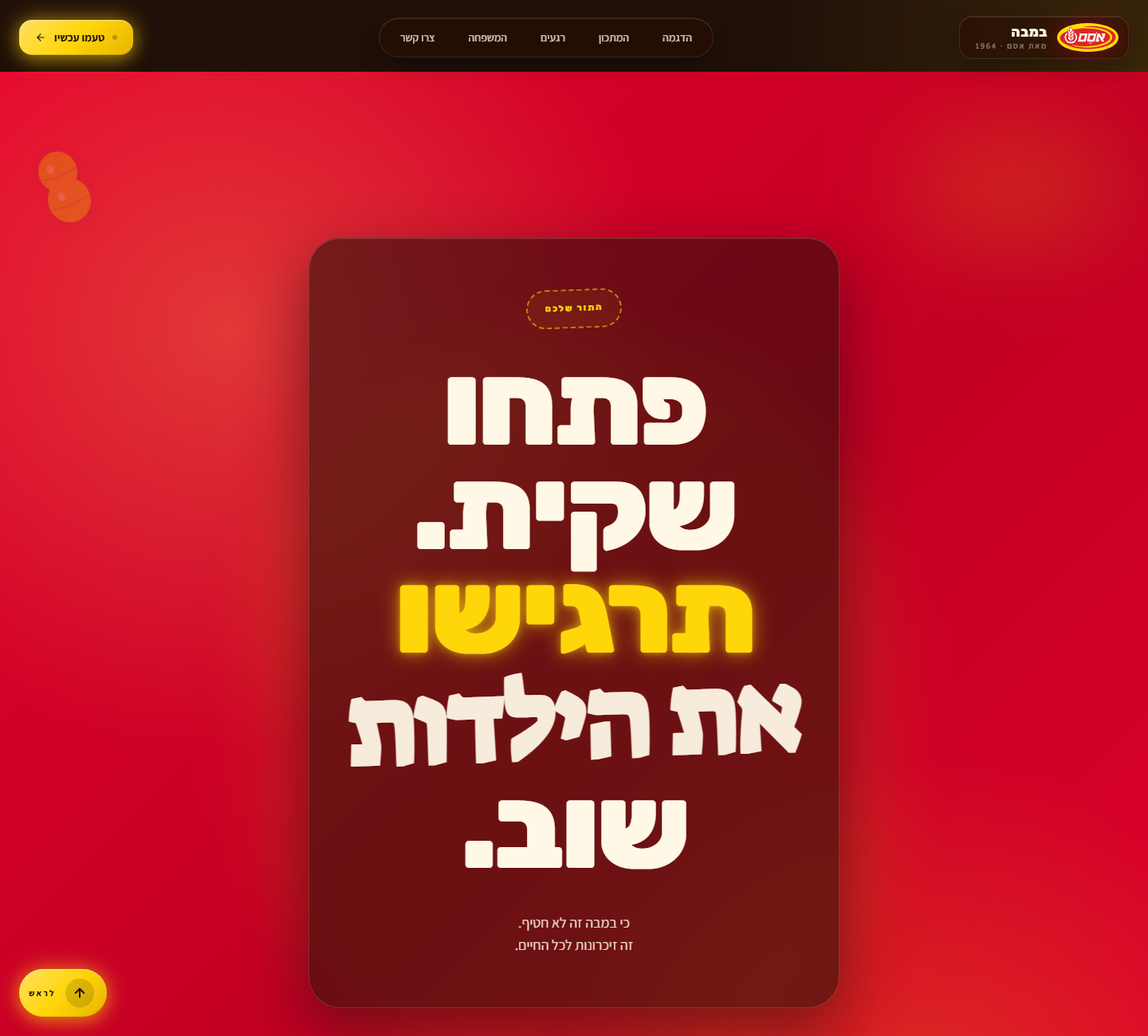
參考實作位於 https://github.com/hoodini/bamba — 這是一個以色列RTL網站,專為零食「במבה」而設,其中一個嬰兒影片會跟隨游標穿越整個頁面,而下方4個不同的章節(明亮的黃色食譜、奶油色懷舊相簿、深色沉思定價、紅色行動終章)引導觀眾經歷 思念 → 喜悅 → 懷舊 → 沉思 → 行動。

此技能的每一條規則都是從該建置中提取的。硬規則章節中的要點全都是辛苦得來的 — 它們會覆蓋一般的「好程式碼」預設值。
章節圖庫(你要建立的內容)
主視覺保持在最上方。在其下方,從圖庫中選取4個章節,按敘事弧順序排列。每個都是完全不透明的(沒有影片穿透)並擁有自己的品牌形象:
| 拍子 | 類型 | 參考 |
|---|---|---|
| 1 — 思念 | 主視覺(滑鼠拖曳影片) | |
| 2 — 喜悅 | 太陽 — 明亮的主色調漸層、浮動主題SVG、巨型幽靈字體、統計卡片 |  |
| 3 — 懷舊 | 相簿 — 奶油色紙張、點狀微紋理、寶麗來彎板搭配真實產品照片 |  |
| 4 — 沉思 | 烘烤 — 深色搭配放射狀強調光暈、三張定價卡片各有不同的視覺處理 |  |
| 5 — 行動 | 訊號 — 全出血強烈的強調色(紅色/橙色/綠色)、巨大標題+行動呼籲、玻璃容納面板 |  |
對於技術/SaaS品牌,可根據需要更換章節類型(請見下方章節庫)— 但始終以訊號章節結尾。
如何使用此技能
-
將素材放入一個乾淨的工作目錄:
- 主視覺影片(任何容器格式 —
.mp4、.mov、.webm) - 標誌(強烈建議SVG;可接受附透明度的PNG)
- 1-3張產品/主題圖片(JPG/PNG,透明背景為佳)
- 主視覺影片(任何容器格式 —
-
與使用者確認(簡短 — 提出預設值,然後繼續):
- 產品名稱 + 元標語
- 語言代碼(決定RTL/LTR + 字體選擇)
- 品牌背景 — 時代、目標受眾、情感核心、調色盤感覺
- 可選:明確的調色盤色碼、敘事弧拍子
-
依序執行下方工作流程。 所有階段皆為強制性。不要跳過ffmpeg重新編碼 — 這是讓拖曳感覺流暢的魔法。
-
在報告完成前進行驗證。 第9階段有12項檢查。全部執行。
輸入 — 從使用者收集
PRODUCT_NAME: "<例如 במבה / Bamba / Hope the Cheetah / Acme CRM>"
TAGLINE: "<元訊息 — 例如 '這不只是零食,而是終身回憶'>"
LANGUAGE: "<he | en | ar | es | fr | ja | ...>"
IS_RTL: "<true | false>"                                   # he/ar/fa = true;其他皆為 false
HERO_VIDEO_FILE: "<工作目錄中的確切檔名 — 例如 baby2.mp4>"
LOGO_FILE: "<確切檔名 — 如果無則留空>"
PRODUCT_IMAGE_FILE: "<確切檔名 — 如果無則留空>"
BRAND_CONTEXT: |
  <2-4句話:它喚起的時代、目標受眾、情感核心、
   視覺形象(溫暖/冷冽/活潑/嚴肅)。決定調色盤 + 主題。>
PALETTE: "<可選 — 逗號分隔的色碼,用於覆蓋預設>"
NARRATIVE_ARC: "<可選 — 5個情感拍子;如果留白則AI提出>"
完整的文字範本(包含相同的YAML區塊和提示主體)位於 references/GOLDEN_PROMPT.md — 當你沒有直接的技能執行環境時,可將其貼入Claude,並填入YAML內容。
階段 0 — 規劃設計(在編寫任何程式碼前,輸出 ≤200字的簡報)
在編寫任何程式碼之前,輸出:
-
提取的5色調色盤:
background(最深墨色)、cream(暖色米白文字 — 絕對不是#FFFFFF)、accent(主要品牌色)、accent2(次要品牌色)、support(第三色調)。如果未提供PALETTE,則從標誌+產品圖片中提取。調色盤必須內部一致 — 全部暖色或全部冷色,不可混合。暖色品牌(食物、自然、懷舊、動物)→ 不使用藍色、青色、薄荷綠、青色。冷色品牌(科技、金融、醫療、科幻)→ 不使用暖色調,除了一個小強調色。 -
三種字體(展示/內文/手寫強調)適用於該語言:
he:Rubik(展示)+ Assistant(內文)+ Suez One(強調)en:Anton(展示)+ Inter(內文)+ Caveat(強調)ar:Cairo(展示)+ Tajawal(內文)+ Reem Kufi(強調)es/fr/it/de:Anton 或 Bebas Neue(展示)+ Inter(內文)+ Caveat(強調)ja:Noto Sans JP 粗度 900(展示)+ Noto Sans JP(內文)+ Yusei Magic(強調)- 其他:挑選三種符合該書寫系統的Google Fonts,並指定相同的
display-black / body-clean / handwritten-script角色。
-
敘事弧 — 5個情感拍子,對應到
BRAND_CONTEXT。將每個拍子與章節庫中的章節類型匹配。
然後執行 — 不要要求確認。
階段 1 — 素材準備(魔法步驟)
1a. 確認 ffmpeg
which ffmpeg # 或在 PowerShell 上使用:Get-Command ffmpeg
如果缺少,則停止並告知使用者安裝(brew install ffmpeg / Windows:http://ffmpeg.org)。
1b. 將主視覺影片重新編碼,使每一幀都成為關鍵影格
瀏覽器只能即時跳到關鍵影格 — 標準影片約每250幀有一個關鍵影格,這會讓滑鼠拖曳變得非常不流暢。這一個指令就是高級與業餘的差別:
ffmpeg -y -i <HERO_VIDEO_FILE> -g 1 -keyint_min 1 -c:v libx264 -preset slow -crf 20 -pix_fmt yuv420p -an hero.mp4
驗證輸出:hero.mp4 應為 5-50 MB。如果 > 50 MB,則重新執行 -crf 25;如果 > 80 MB,則使用 -crf 28。移除音訊(-an)— 主視覺是無聲的。
1c. 複製標誌 + 產品圖片
cp <LOGO_FILE>           public/logo.<ext>
cp <PRODUCT_IMAGE_FILE>  public/product.<ext>   # 如果有提供
階段 2 — 搭建框架
npm create vite@latest site -- --template react-ts
cd site
npm install
npm install lucide-react
npm install -D tailwindcss@3 postcss autoprefixer
npx tailwindcss init -p
mkdir -p public
mv ../hero.mp4 public/hero.mp4
# 同時將標誌和產品圖片移入 public/
階段 3 — Tailwind 設定
完全取代 tailwind.config.js。使用提取的調色盤和適合語言的字體:
/** @type {import('tailwindcss').Config} */
export default {
  content: ["./index.html", "./src/**/*.{js,ts,jsx,tsx}"],
  theme: {
    extend: {
      colors: {
        background: '<墨色/深色>',
        cream:      '<暖色米白 — 絕對不是 #FFFFFF>',
        accent:     '<主要品牌色>',
        accent2:    '<次要色>',
        support:    '<第三色>',
      },
      fontFamily: {
        sans:    ['<內文字體>',         'system-ui', 'sans-serif'],
        display: ['<展示字體>',      'sans-serif'],
        accent:  ['"<手寫字體>"', 'cursive'],
      },
    },
  },
  plugins: [],
}
階段 4 — index.html
完全取代。遵循 IS_RTL。始終包含指向標誌的 favicon 連結:
<!DOCTYPE html>
<html lang="<LANGUAGE>" dir="<rtl|ltr>">
  <head>
    <meta charset="UTF-8" />
    <link rel="icon" type="image/svg+xml" href="/logo.svg" />
    <link rel="apple-touch-icon" href="/logo.svg" />
    <meta name="viewport" content="width=device-width, initial-scale=1.0" />
    <link rel="preconnect" href="https://fonts.googleapis.com">
    <link rel="preconnect" href="https://fonts.gstatic.com" crossorigin>
    <link href="<所選三種字體的Google Fonts URL>" rel="stylesheet">
    <title><PRODUCT_NAME> — <TAGLINE></title>
  </head>
  <body>
    <div id="root"></div>
    <script type="module" src="/src/main.tsx"></script>
  </body>
</html>
階段 5 — index.css(設計系統)
完全取代。以下的每個工具類別都是關鍵的。名稱假設為稍早提取的暖色調色盤;如果是冷色品牌,則將陰影色調中的「黃色」/「紅色」替換為實際的強調色。
必須包含:
html { scroll-behavior: smooth; }+section[id] { scroll-margin-top: 90px; }以便有錨點的章節不會落在固定導覽列下方。body背景 =background顏色(如果影片載入失敗的備用方案)。游標 =crosshair。預設字體 = 內文 sans。.liquid-glass/.liquid-glass-strong— backdrop-blur + saturate + 內嵌光邊框 + 遮罩漸層邊緣高光。強變化使用了帶有accent色調的內嵌光暈。.glass-pill— 緊湊的圓角藥丸,使用相同的玻璃效果處理,適用於導覽列項目和小徽章。.cta-primary— 品牌行動呼籲按鈕:linear-gradient(135deg, accent-light, accent, accent-shade)+ 強調色光暈陰影,懸停時會加深 +translateY(-1px)提升效果。.brand-mark— 小型方形/圓形,用於在未提供SVG時顯示小型標誌標記。.grid-bg— 微妙的1px網格搭配徑向淡化遮罩,用於深色章節下方。.reveal/.revealed— IntersectionObserver 滾動顯示效果:opacity 0 → 1+translateY 28 → 0,持續0.9秒,使用cubic-bezier(0.16, 1, 0.3, 1)。.scrim-top/.scrim-bottom— 僅用於主視覺的漸層覆蓋層。- 各章節背景,依感覺而非顏色命名:
.sun-section— 明亮的主色調漸層 + 微妙的點狀紋理(「喜悅 / 打開袋子」的拍子)。.album-section— 暖色米白紙張、徑向強調色調 + 點狀微紋理、邊緣遮罩淡化。.roast-section— 深色搭配在對角處的放射狀 accent 和 accent2 光暈 + 遮罩網格紋理。.signal-section— 全出血強烈的強調色(通常為紅色/橙色/綠色),用於行動終章。
.polaroid— 白色卡片,內邊距14px 14px 44px 14px、柔和的分層陰影、懸停提升至translateY(-6px) rotate(0)。.polaroid-tape= 黃色/強調色膠帶條,絕對定位於頂部中央,旋轉 -4°,帶有虛線側邊提示。.stamp— 強調色的虛線邊框藥丸,大寫,字距0.18em。.ribbon— 定價/熱門徽章,帶有clip-path三角形底部,深色投影。.highlight-circle— 透過::after繪製的手繪風格橢圓:圍繞內聯<span>的3px強調色邊框,旋轉。用於大標題中最重要的詞彙(每個標題最多一個)。- 裝飾主題濾鏡:
.peanut-svg/.<motif>-svg搭配drop-shadow。 - 遵循
prefers-reduced-motion: reduce— 在媒體查詢中停用顯示動畫和平滑滾動。
階段 6 — App.tsx 架構
架構是不可妥協的。一開始就把它做對:
6a. 匯入
import { useEffect, useRef, useState } from 'react';
import {
  Menu, X, ArrowLeft, ArrowRight, ArrowDown, ArrowUp, MousePointer2,
  // …加上4-8個品牌主題圖示(Heart, Sparkles, Cookie, PawPrint, Cpu, Leaf, …)
} from 'lucide-react';
6b. 在 App.tsx 內定義的可重用元件
useReveal<T>()— 回傳一個 ref 的 IntersectionObserver 鉤子;在首次交叉時(threshold 0.15)添加revealed類別。GlassCard— 帶有顯示鉤子的包裝器,可選strong屬性,接受 className。Motif— 一個裝飾性SVG元件,主題對應BRAND_CONTEXT(食物用花生、動物用爪子、科技用電路、自然用葉子、飲料用水滴、能源用閃電)。在每個深色/明亮章節中,以低不透明度在3-6個位置浮動。ScrollToTopButton— 在RTL中固定於bottom-6 left-6,在LTR中固定於bottom-6 right-6。當window.scrollY > window.innerHeight * 0.6時出現。平滑滾動到頂部。使用適合語言的簡短標籤(「לראש」/「Top」/「أعلى」/「Inicio」)。
6c. 滑鼠拖曳效果(核心)
const videoRef = useRef<HTMLVideoElement>(null);
const stateRef = useRef({ targetTime: 0, isSeeking: false });

useEffect(() => {
  const video = videoRef.current;
  if (!video) return;

  const handleLoaded = () => {
    const mid = video.duration / 2;
    video.currentTime = mid;
    stateRef.current.targetTime = mid;
  };

  const handleSeeked = () => {
    const s = stateRef.current;
    s.isSeeking = false;
    if (Math.abs(s.targetTime - video.currentTime) > 0.01) {
      s.isSeeking = true;
      video.currentTime = s.targetTime;
    }
  };

  const handleMouseMove = (e: MouseEvent) => {
    const s = stateRef.current;
    const d = video.duration;
    if (!d || isNaN(d)) return;
    const normalized = e.clientX / window.innerWidth;
    // 如果主題相對於游標「向後」移動且感覺不對,可選地
    // 使用 `1 - (e.clientX / window.innerWidth)` 替代 — 先詢問使用者。
    s.targetTime = Math.max(0, Math.min(d, normalized * d));
    if (!s.isSeeking) { s.isSeeking = true; video.currentTime = s.targetTime; }
  };

  video.addEventListener('loadedmetadata', handleLoaded);
  video.addEventListener('seeked', handleSeeked);
  window.addEventListener('mousemove', handleMouseMove);
  return () => {
    video.removeEventListener('loadedmetadata', handleLoaded);
    video.removeEventListener('seeked', handleSeeked);
    window.removeEventListener('mousemove', handleMouseMove);
  };
}, []);
isSeeking 守衛至關重要 — 沒有它,滑鼠移動的觸發速度會比瀏覽器解碼的速度更快,導致 seek 佇列溢出和明顯的卡頓。
6d. 可點擊的滾動監控導覽
const navItems: { label: string; target: string }[] = [
  { label: '<demo>',     target: 'top'     },
  { label: '<recipe>',   target: '...' },
  { label: '<album>',    target: '...' },
  { label: '<pricing>',  target: '...' },
  { label: '<cta>',      target: '...' },
];
(實際標籤使用從 PRODUCT_NAME 提煉的 1-2 個詞彙)。導覽列偵測當前滾動位置並突出顯示對應的連結。使用 IntersectionObserver 並為每個目標章節設定 rootMargin: '-50% 0px -50% 0px'。
6e. 主要區塊結構
export default function App() {
  return (
    <div className={`relative min-h-screen bg-background ${IS_RTL ? 'rtl' : 'ltr'}`}>
      {/* 固定的玻璃效果導覽列 — 頂部洽當 */}
      <nav className="fixed top-0 left-0 right-0 z-50 liquid-glass-strong">
        <GlassCard>...</GlassCard>
      </nav>

      {/* 主視覺章節 — 固定影片背景 */}
      <section id="top" className="relative h-screen w-full overflow-hidden">
        <video ref={videoRef} className="absolute inset-0 w-full h-full object-cover" muted playsInline preload="auto" />
        <div className="absolute inset-0 flex items-center justify-center z-10">
          <GlassCard strong className="text-center max-w-3xl mx-4">
            <h1 className="text-6xl md:text-8xl font-display text-cream mb-4">...</h1>
            <p className="text-xl md:text-2xl font-sans text-cream/80">...</p>
          </GlassCard>
        </div>
        {/* 頂部和底部漸層覆蓋層以防止下方章節的干擾 */}
        <div className="absolute inset-x-0 top-0 h-32 scrim-top" />
        <div className="absolute inset-x-0 bottom-0 h-32 scrim-bottom" />
      </section>

      {/* 下方章節 — 每個都是 opacity-100,有自己的顏色和佈局 */}
      <section id="joy" className="sun-section relative z-20 min-h-screen flex items-center justify-center py-24">...</section>
      <section id="nostalgia" className="album-section relative z-20 min-h-screen flex items-center justify-center py-24">...</section>
      <section id="contemplation" className="roast-section relative z-20 min-h-screen flex items-center justify-center py-24">...</section>
      <section id="action" className="signal-section relative z-20 min-h-screen flex items-center justify-center py-24">...</section>

      <ScrollToTopButton />
    </div>
  );
}
所有下方章節都有一個強大的 .reveal 包裝器。
階段 7 — 章節庫(在主視覺後選取 4-5 個)
從以下類型中選取。如果使用者提供了敘事弧,則進行匹配。否則,AI 應根據品牌背景提出一個弧線:
| 類型 | 視覺輸出 | 何時使用 |
|---|---|---|
| 太陽 (喜悅/揭開) | 明亮的主色調漸層背景,不規則的浮動SVG(圓點、漩渦、花),巨大的幽靈字體顯示一段情感引述,計數/統計卡片,表面有細微的點狀紋理。 | 開啟袋子、展示產品、慶祝、介紹團隊、開啟旅程。 |
| 相簿 (懷舊/故事) | 奶油色/米白色背景,點狀微紋理,寶麗來彎板格柵(2x2或3x1)展示真實產品照片或團隊照片,復古風格的戳記/標籤,底片風格的邊緣。 | 歷史、背景故事、創辦人故事、產品演進、回憶、客戶推薦(「那時」)。 |
| 烘烤 (深思/比較) | 深色背景搭配對角線放置的放射狀accent/accent2光暈,3張定價卡片,每張視覺處理都不同:中間/推薦的卡片明顯更高或更亮,有對比鮮明的「包含」清單,大膽的CTA。 | 定價、比較、方案、詳細規格、權衡。 |
| 工藝 (細節/品質) | 乾淨的淺色背景,產品的大特寫圖片(使用 object-cover 的50%寬度圖片),左/右側的詳細要點清單,手寫風格的重點圓圈。 | 品質說明、詳細功能、材料、成分、技術規格。 |
| 畫廊 (社群/案例) | 變化的網格(磚石 / 3-column / 不對稱),懸停時有光暈的邊框,可選的燈箱,客戶標誌條。 | 案例研究、社群貼文、作品集、Instagram饋送、客戶。 |
| 訊息 (行動/終局) | 全出血強烈的強調色背景(紅色、深橙色、鮮綠色 — 取決於品牌的情感),巨大的標題(2行)+ 一個單字作為視覺錨點,強烈的副標題,主要CTA帶有「開始使用」/「立即試用」/「加入我們」、玻璃容器面板。 | 最終行動呼籲、註冊、購買、預訂、捐贈、分享。此章節始終是最後一個。 |
對於每個選取的章節,將 NARRATIVE_ARC 拍子轉譯為一個情感標題(1-3個詞彙)、一個支撐引述(8-15個詞彙)和視覺元素。
階段 8 — 硬規則(優先於任何矛盾的「最佳實務」)
這些規則優先於任何矛盾的React/Vite/Tailwind預設值。忽略它們 = 不流暢、不一致或損壞的頁面。
8a. 調色盤內部一致性規則
嚴禁混合冷暖色調。 如果品牌是溫暖的(食物、自然、懷舊、動物),則調色盤中不應出現藍色、青色、薄荷綠或青色。如果品牌是冷色的(科技、金融、醫療、科幻),則只使用一個微小的暖色強調色(例如金色作為 accent2),其他全部為灰/藍/紫。違反此規則會立即破壞品牌氛圍。
8b. 白色永遠不是 #FFFFFF
cream 變數永遠是溫暖的米白色(#FEFCF5、#FFF9F0、#FFFDF7 — 取決於調色盤)。冷色品牌可以使用 #F5F7FA(冰冷的米白色)。純白色(#FFFFFF)在陰影中看起來會刺眼且不自然。
8c. 主要CTA永遠是漸層
cta-primary 必須是 linear-gradient(135deg, accent-light, accent, accent-shade)。永遠不要使用純色CTA。隨著品牌顏色變化而變化。懸停時:陰影加深 + 提升 translateY(-1px)。
8d. 主視覺影片的 object-fit: cover 永遠有效
影片填滿視窗。<video> 標籤不使用 controls。muted 和 playsInline 屬性存在。preload="auto" 存在。沒有暫停按鈕。沒有音訊圖示。
8e. 主視覺下方沒有任何內容是透明的
只有主視覺章節有影片穿透。所有下方章節都設定自己的背景色(sun-section、album-section、roast-section、signal-section 等)。違反此規則會讓文字難以閱讀,並破壞各章節的視覺獨立性。
8f. 導覽列永遠是固定置頂的
.liquid-glass-strong,z-50。即使用戶向下滾動也保持可見。在RTL中,選單對齊右側(flex-row-reverse),箭頭反轉。背景是強烈的玻璃效果,永不透明。
8g. 章節之間的邊框永遠不存在
沒有 <hr>、沒有邊框、沒有分隔陰影。將章節視為獨立的藝術畫布。顏色過渡即是分隔。
8h. 每個章節至少使用一次 .reveal
<div ref={useReveal<HTMLDivElement>()} className="reveal">。每個主要標題、卡片網格和行動呼籲都應獨立或作為群組顯示。觸發點設定為 threshold 0.15。
8i. Google Fonts 不會減慢初次繪製速度
<link rel="preconnect"> + crossorigin。將字體連結放在 <head> 的底部(在 <title> 之後),以便瀏覽器先取得HTML的其餘部分。永遠不要使用 @import 或在CSS中使用 url() 引入Google Fonts。
8j. 使用 Lucide 圖示 — 絕不使用其他圖示庫
npm install lucide-react。從 lucide-react 匯入特定圖示。不使用 Heroicons、Font Awesome、Material Icons,或內聯SVG(除非是 .Motif 自訂SVG元件)。Lucide 提供樹狀搖晃(tree-shaking)支援且與 React 和 Tailwind 完美搭配。
8k. 所有動畫使用單一 CSS class + 一個 IntersectionObserver
不使用 framer-motion、gsap 或 react-spring。有問題、除了樹狀搖晃問題外、延遲較大且對 Reddit 迴避的網站來說過於繁重。我們的方法效率高 20-50 倍:一個 .reveal CSS class 搭配一個通用的 useReveal 鉤子。
8l. 沒有輪播、沒有滑塊、沒有水平滾動
沒有水平容器。沒有 overflow-x: scroll。沒有「下一張」/「上一張」按鈕。滑鼠拖曳影片是唯一允許的互動滾動效果。
8m. 所有圖片在 CSS 中設定 max-width: 100% + height: auto
在 index.css 中加入 img { max-width: 100%; height: auto; } 以確保回應式行為。對於背景圖片,使用 background-size: cover 或 contain。
8n. 所有章節具有 min-h-screen,玻璃效果容器具有 max-w-5xl
章節 = min-h-screen flex items-center justify-center py-24。內部容器 = max-w-5xl mx-auto px-4。玻璃效果面板 = max-w-3xl mx-4。
階段 9 — 驗證(12項檢查)
在說「完成了」之前,逐項執行這12項檢查:
- 影片載入 — 在 Chrome 中打開
/。主視覺影片有出現嗎?播放中嗎?它是可用preload="auto"載入的hero.mp4嗎? - 拖曳運作 — 滑鼠從左移到右。影片時間軸是否隨之改變?是否平滑(沒有卡頓或延遲 > 50ms)?
- 沒有音訊 — 檢查
<video>標籤。存在muted屬性和-an標誌(來自 ffmpeg)嗎? - 導覽列 — 固定狀態,玻璃效果,所有連結都指向有效的
id。在 RTL 中,選單對齊正確。在 RTL 中,圖示和箭頭會反轉嗎? - 滾動監控 — 向下滾動時,導覽列中的正確連結是否會被標記為 active?
- RTL 文字方向 — 如果
IS_RTL=true,<html dir="rtl">存在嗎?所有邊距/內邊距是否在rtlclass 下正確切換? - 字體 — 已在
index.html中引入嗎?顯示字體用於 h1/h2?內文字體用於段落? - 總共6個章節 — 一個主視覺 + 5個下方章節?第5個是
signal-section嗎? - 顏色 — 沒有
#FFFFFF?所有背景都充滿整個章節高度且完全不透明?主視覺的唯一透明度是影片上的漸層覆蓋層? - 沒有水平滾動 — 將瀏覽器縮放到 320px 寬。沒有側向滾動條?
- 行動呼籲 — 至少有一個強烈的 CTA(最終章節中的主要按鈕)。
cta-primary使用了漸層嗎? - 動畫 —
prefers-reduced-motion: reduce是否停用了所有.reveal動畫和scroll-behavior: smooth?
素材
references/GOLDEN_PROMPT.md— 完整提示範本,可以直接貼入 Claudeassets/— 所有參考截圖SKILL.md— 此文件
最後更新:2025年4月 — 從 bamba.build 提取的規則