Daily Literature Radar Skill
Daily Literature Radar is a Codex skill for tracking economics papers from target journals, working paper sources, RSS feeds, and watched authors. It fetches open metadata, ranks papers against a user-defined research profile, and renders a daily digest.
The basic version generates Markdown. The advanced version runs on a daily schedule and sends the digest as a formatted HTML email with a Markdown fallback.
Current source libraries include Crossref for target journals, official NBER working paper metadata, and generic RSS/Atom feeds such as CEPR, RePEc/NEP, Federal Reserve feeds, and journal alerts. Additional working paper repositories can be added as RSS feeds or source adapters.
Recommended: Configure With Codex
This skill is designed to be configured with help from Codex or Claude Code. A coding agent can help turn your research interests into a working daily-econ-literature-radar.config.json by:
- translating your research topics into
fields,keywords,jel_codes,methods, andgeographies - recommending field-top journals after your research profile is defined, then adding only the journals you choose
- finding and verifying journal ISSNs before adding them to
target_journals - adding target authors and name aliases
- adding RSS feeds or NBER program/working-group filters
- configuring Gmail SMTP and a scheduler for the advanced fixed-time daily email version
The basic setup only needs Markdown output. The advanced setup sends a daily HTML email digest automatically after Gmail SMTP and a scheduler are configured.
What It Does
- Monitors target journals through Crossref ISSN queries.
- Monitors NBER working papers through official NBER metadata TSV files.
- Monitors RSS/Atom sources such as CEPR, RePEc/NEP, Federal Reserve feeds, or journal alerts.
- Tracks target authors across all fetched metadata.
- Ranks candidate papers by source, target journal status, target author match, topic match, JEL/method/geography match, and abstract/title keyword match.
- Deduplicates papers by DOI or title/author fallback.
- Outputs at most
max_paperspapers per run, default10. - Produces a Markdown digest.
- Optionally sends an HTML email digest through Gmail SMTP or another SMTP provider on a fixed daily schedule.
- Does not download paywalled PDFs or restricted full text.
Project Structure
daily-econ-literature-radar/
├── README.md
├── config.example.json
├── example-output/
│   ├── sample-digest.md
│   ├── sample-email.html
│   └── sample-email-preview.png
├── .gitignore
└── daily-econ-literature-radar/
    ├── SKILL.md
    ├── agents/openai.yaml
    ├── references/
    │   ├── default-config.md
    │   ├── journal-watchlist.md
    │   └── source-notes.md
    └── scripts/
        ├── economics_literature_radar.py
        ├── render_digest.py
        ├── send_digest.py
        └── run_daily_radar.py
Inputs
Configure inputs in daily-econ-literature-radar.config.json.
Research Profile
Used for relevance ranking:
fields: broad research fieldsjel_codes: JEL codes or partial JEL familieskeywords: topic keywordsmethods: methods or empirical designsgeographies: countries, regions, datasets, or settings
Target Journals
Exact journal monitoring through Crossref. The economics Top 5 journals are enabled by default. After the research profile is set, the skill can recommend field-top journals; the user should choose which recommendations to add. Each journal should include:
nametierfieldissn
Example:
{
  "name": "Journal Name",
  "tier": "field_top",
  "field": "labor",
  "issn": ["0000-0000"]
}
Verify ISSNs before adding them.
Target Authors
Author names and aliases to prioritize:
{
  "name": "Author Name",
  "aliases": ["A. Name", "Author M. Name"],
  "notes": "Optional note"
}
Sources
nber: official NBER metadata adapterrss_feeds: CEPR, RePEc/NEP, Fed, journal alerts, or other RSS/Atom feedstarget_journals: Crossref ISSN queries
Limits
max_papers: final digest sizeper_source_rows: number of rows to request per source querysource_caps: soft caps that prevent one source type from crowding out the digest
Email is optional. Set email.enabled to true only after configuring SMTP credentials.
Outputs
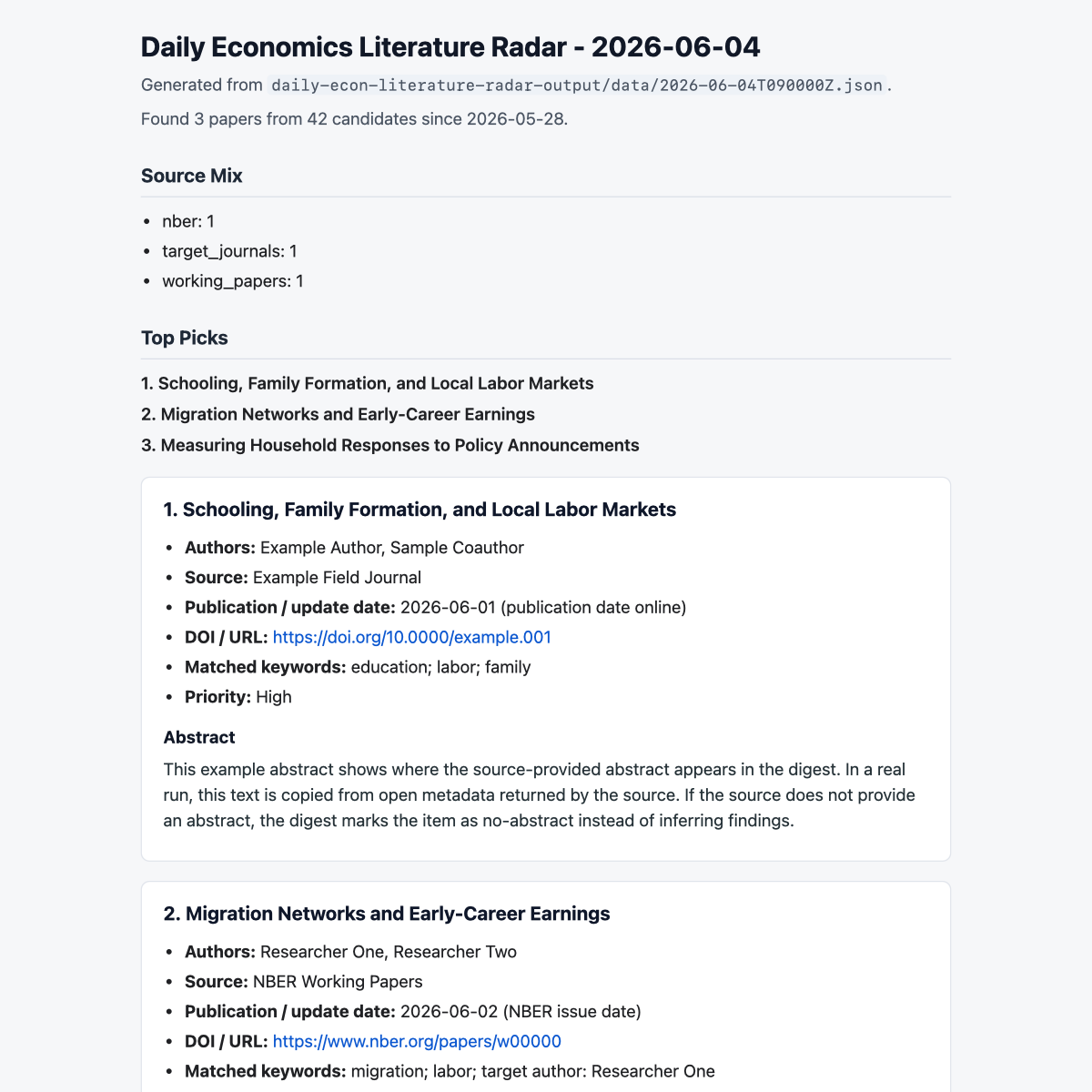
Example outputs are included in example-output/sample-digest.md, example-output/sample-email.html, and example-output/sample-email-preview.png. They use synthetic paper metadata while preserving the same structure and email styling as real runs.

Fetch JSON
Generated by fetch:
daily-econ-literature-radar-output/data/YYYY-MM-DDTHHMMSSZ.json
Each paper record can include:
titleauthorssourcesource_kinddatedate_typedoiurlabstractkeywordsmatched_termspriorityscorenotes
Markdown Digest
Generated by render_digest.py:
daily-econ-literature-radar-output/YYYY-MM-DD.md
Each paper includes title, authors, source, publication/update date, DOI/URL, matched terms, priority, abstract, and notes.
Email Digest
Generated by send_digest.py or run_daily_radar.py when email is enabled. The email includes:
- HTML body for readable Gmail/Outlook display
- plain-text Markdown fallback
How to Use
Tip: ask Codex or Claude Code to help configure the research profile, field-top journal choices, target authors, and scheduled email sending. Gmail SMTP with a Google App Password has been tested and works.
Basic Version: Markdown Only
From the project root:
cp config.example.json daily-econ-literature-radar.config.json
Edit daily-econ-literature-radar.config.json with your research profile, authors, and sources. Keep the default Top 5 journals if desired, then add field-top journals after choosing from recommendations.
Fetch papers:
python3 daily-econ-literature-radar/scripts/economics_literature_radar.py fetch --config daily-econ-literature-radar.config.json
Render Markdown:
python3 daily-econ-literature-radar/scripts/render_digest.py \
  daily-econ-literature-radar-output/data/YYYY-MM-DDTHHMMSSZ.json \
  --output daily-econ-literature-radar-output/YYYY-MM-DD.md
After reviewing the digest, mark successful processing:
python3 daily-econ-literature-radar/scripts/economics_literature_radar.py mark-success \
  --config daily-econ-literature-radar.config.json \
  --data daily-econ-literature-radar-output/data/YYYY-MM-DDTHHMMSSZ.json
mark-success updates state.json so future runs do not repeat the same papers.
Advanced Version: Fixed-Time Daily Email
The advanced version is a scheduled workflow. The scripts do not run as a background daemon by themselves; a scheduler such as Codex automation, cron, macOS LaunchAgent, or Windows Task Scheduler should call run_daily_radar.py at the desired time each day.
Configure the desired delivery time in your scheduler. You can also record it in the config:
"push_time": "09:00",
"timezone": "America/Toronto"
Gmail SMTP
The current implementation has been tested with Gmail SMTP and a Google App Password.
Set in daily-econ-literature-radar.config.json:
"email": {
  "enabled": true,
  "provider": "gmail_smtp",
  "from": "Daily Literature Radar <[email protected]>",
  "to": "[email protected]",
  "smtp_host": "smtp.gmail.com",
  "smtp_port": 587,
  "smtp_username": "[email protected]",
  "smtp_password_env": "DAILY_RADAR_GMAIL_APP_PASSWORD",
  "smtp_password_file": ".secrets/gmail_app_password",
  "use_starttls": true
}
Gmail usually requires a Google App Password rather than your normal Google password. Create one from your Google Account security settings, then store it in one of these ways.
Environment variable:
export DAILY_RADAR_GMAIL_APP_PASSWORD="your-app-password"
Ignored local file:
mkdir -p .secrets
printf '%s' 'your-app-password' > .secrets/gmail_app_password
chmod 600 .secrets/gmail_app_password
The .gitignore file excludes .secrets/, .env, local configs, and outputs.
Send One Digest
python3 daily-econ-literature-radar/scripts/send_digest.py \
  daily-econ-literature-radar-output/YYYY-MM-DD.md \
  --config daily-econ-literature-radar.config.json
Run the Full Email Pipeline
python3 daily-econ-literature-radar/scripts/run_daily_radar.py --config daily-econ-literature-radar.config.json
This runs:
fetch -> render Markdown -> send HTML email -> mark-success
It marks success only after the email send succeeds.
Schedule Daily Delivery
Schedule this exact command to run once per day at your chosen time:
python3 daily-econ-literature-radar/scripts/run_daily_radar.py --config daily-econ-literature-radar.config.json
That command performs the full daily email workflow:
fetch -> render Markdown -> send HTML email -> mark-success
Scheduling Options
Codex Automation
Create a daily cron automation that runs from this project directory:
python3 daily-econ-literature-radar/scripts/run_daily_radar.py --config daily-econ-literature-radar.config.json
Use the user's preferred local time zone and time, for example 09:00 daily.
macOS Cron or LaunchAgent
This project was developed and tested on a MacBook/macOS environment with Python 3. The simplest macOS scheduling options are:
- Codex automation
cronlaunchd/ LaunchAgent
For cron, make sure the job starts in the project directory and uses the same Python executable that worked in testing.
Windows Compatibility
The current version is MacBook/macOS-tested. The Python scripts are standard-library only and should be portable, but Windows users should adjust:
- Use
pythonorpy -3instead ofpython3. - Use PowerShell path syntax and quote paths containing spaces.
- Use Windows Task Scheduler instead of cron/launchd.
- Replace
chmod 600with Windows file permissions or store the app password in an environment variable. - Use
.secrets\gmail_app_passwordin Windows paths if using a file secret. - Confirm TLS SMTP connections are allowed by local firewall or antivirus tools.
Example PowerShell command:
cd "C:\path\to\daily-econ-literature-radar"
py -3 daily-econ-literature-radar\scripts\run_daily_radar.py --config daily-econ-literature-radar.config.json
Privacy and Safety
Do not commit:
daily-econ-literature-radar.config.json.secrets/.envdaily-econ-literature-radar-output/
The skill only uses metadata and abstracts provided by sources. It does not download paywalled PDFs or restricted full text. If a source has no abstract, the digest marks the paper as no-abstract/title-only instead of inferring findings.
Notes for Customization
- Keep
max_paperssmall enough that the digest remains readable. - Top 5 journals are enabled by default; add field-top journals by verified ISSN after choosing from recommendations.
- Add target authors with aliases for initials or name variants.
- Add RSS feeds gradually and review quality before scheduling daily delivery.
- Use source caps to prevent one source from dominating the digest.