DESIGN:OS CLI
Onboard your project's design system into one standard ontology, then build an autonomous design agent on it.
DESIGN:OS CLI reads the tokens, components and docs your project already has and compiles them into a sealed design/ store: DTCG tokens with modes, a component registry, a declared stance and a hash-sealed manifest. Your coding agent (Claude Code, Codex or Antigravity) then loads that store before every task, works with the project's own names and values, and runs deterministic gates on what it makes. The CLI itself never calls a model and sends nothing off your machine.
FREE + source-available (PolyForm Shield 1.0.0). Published on npm as ease-design; the command is ui.
Quickstart
Node 20 or later. Run these in your project:
npx ease-design scan                    # what design signals does this project have?
npx ease-design init --runtime claude   # or codex, antigravity, or --all
npx ease-design onboard                 # setup checklist and the next command to run
Onboard a CSS design system (custom properties) into the store:
npx ease-design designmd extract-tokens index.html --css styles.css --out extract.json
npx ease-design ingest-css-ds extract.json --out capture --name acme
npx ease-design ds import capture/tokens.json --dir . --name acme
npx ease-design ds context              # the block your agent loads first
Optional: generate Claude Code project agents bound to that store.
npx ease-design agents init # designer, curator, figma-hand
To keep ui on your path: npm install -g ease-design.
How it works
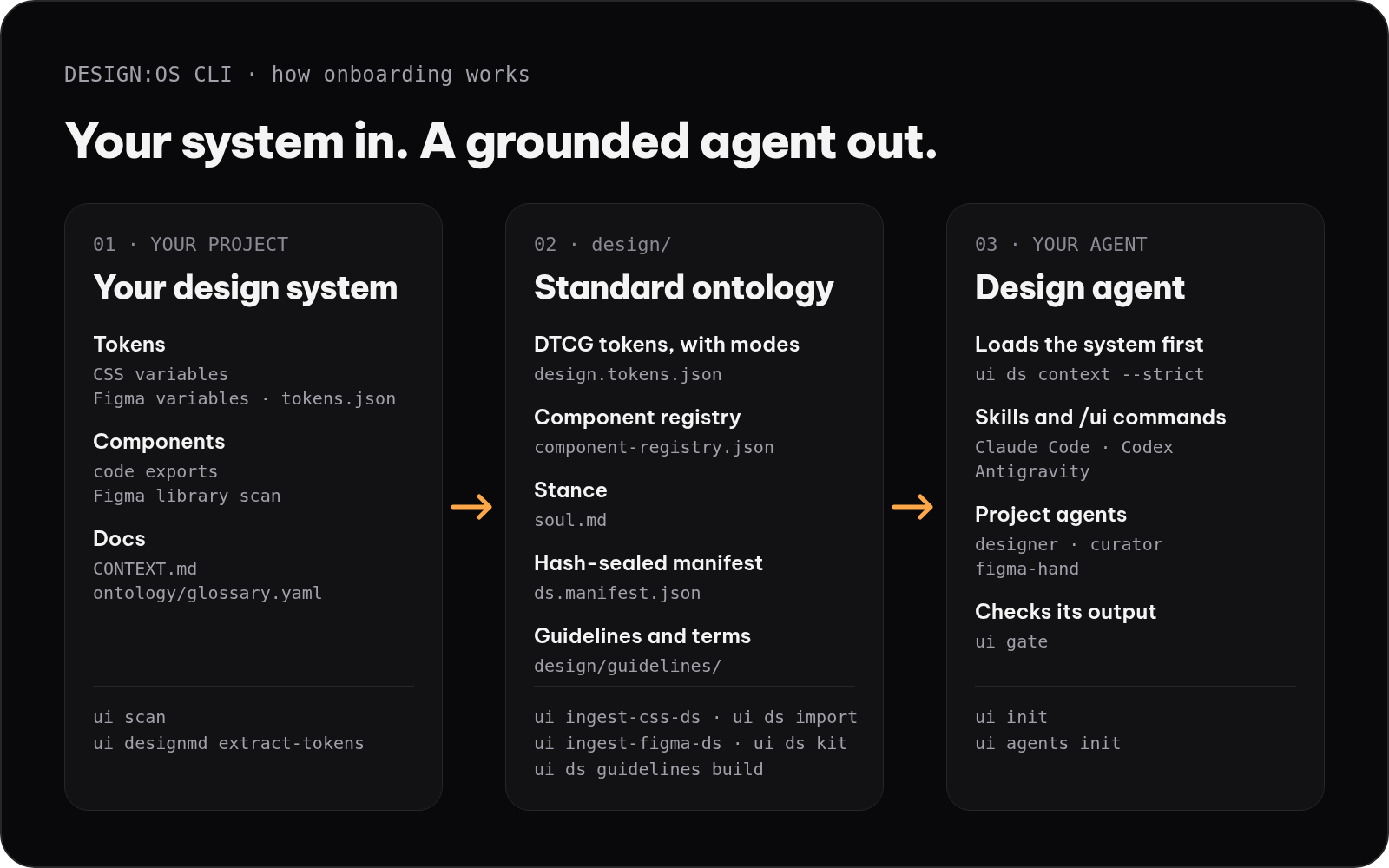
1. Your design system. ui scan detects the framework, styling and component folders. Tokens come from CSS custom properties (ui designmd extract-tokens), a Figma library scan made with Bridge, or a flat tokens.json. Components come from your code exports or the same Figma scan. CONTEXT.md and ontology/glossary.yaml supply the project's terms.
2. The standard ontology. Every source compiles into the same design/ store:
| File | What it holds |
|---|---|
design.tokens.json | W3C DTCG tokens: primitives, semantic aliases, Light and Dark modes |
component-registry.json | Every component by its exact owner name, with variants, states and the tokens it uses |
soul.md | The declared stance: what the system never does, always does, and how it speaks |
ds.manifest.json | Generation, persona and the hashes that seal the store |
guidelines/ | A cited guidelines pack compiled from the store, rulings and glossary (ui ds guidelines build) |
ui ingest-css-ds, ui ingest-figma-ds and ui ds import write it; ui ds kit plan | prepare | validate | adopt | verify takes a full component kit from capture to a verified, adopted state. After that, tokens change through ui ds change-token and ui ds set-role. A hand edit breaks the seal: ui ds status and ui ds context report the hash mismatch until the change goes through the CLI or ui ds reseal.
3. Your design agent. ui init writes skills, /ui commands and routing rules for Claude Code, Antigravity or Codex. ui agents init adds three project agents named after your project (designer, curator, figma-hand), from one roster, for Claude Code, Codex and Antigravity. Each one loads ui ds context before it acts, and the designer looks up every component it uses with ui registry lookup, so it works from your tokens and components instead of defaults. ui gate checks what the agent builds: layout, accessibility, taste, tells, copy and design-system usage, in one verdict.
Commands
| Command | What it does |
|---|---|
ui scan · ui onboard | Detect existing design signals; show the setup checklist. Read-only |
ui ingest-css-ds · ui ingest-figma-ds · ui ds import | Compile CSS variables, a Figma scan or a flat tokens.json into the design/ store |
ui ds kit | Plan, prepare, validate, adopt and verify a complete component kit |
ui ds context | Emit the active design system as the context block for your agent |
ui ds status · ui ds diff · ui ds a11y | Manifest summary; semver-classified diff between two states; token contrast audit |
ui ds guidelines build | check | export | Compile, lint and export the guidelines pack |
ui init · ui agents init | Write the runtime adapters; generate project agents |
ui gate | Composed floor judge over every linter family: layout, a11y, taste, tell, content, ds-usage |
ui taste-lint — 35 absolute checks | Generated-UI taste floor: motion, typography, spacing and focus states |
ui validate-layout — 20 checks | Structure and overflow safety (100vw traps, unclosed tags, sticky overflow) |
ui content-lint — 15 checks | Honest copy: placeholder text, lorem ipsum, generic names, all-caps shouting |
ui tell-lint — 43 checks, any language | Design tells across HTML, JSX/TSX, Vue, Svelte, CSS, SwiftUI and Flutter |
ui tokens · ui color | Compile DTCG tokens to CSS, Tailwind or Figma variables; OKLCH colour math |
ui doctor | Check that the install and the project are healthy |
ui --help lists all commands; ui schema --json emits machine-readable signatures for every one.
Install for your agent
ui init above wires a project. To install the skill itself:
Claude Code
/plugin marketplace add jangtrinh/design-os
/plugin install design-os@design-os
Codex
This repository also ships .codex-plugin/plugin.json for native Codex plugin discovery.
git clone https://github.com/jangtrinh/design-os.git /tmp/design-os
mkdir -p ~/.codex/skills/design-os ~/.codex/prompts
cp -R /tmp/design-os/skills/design-os/* ~/.codex/skills/design-os/
cp /tmp/design-os/prompts/doctor.md ~/.codex/prompts/design-os-doctor.md
rm -rf /tmp/design-os
Gemini CLI and Antigravity
git clone https://github.com/jangtrinh/design-os.git /tmp/design-os
mkdir -p ~/.gemini/skills/design-os
cp -R /tmp/design-os/skills/design-os/* ~/.gemini/skills/design-os/
rm -rf /tmp/design-os
Other harnesses (OpenCode, Cursor, Windsurf)
git clone https://github.com/jangtrinh/design-os.git /tmp/design-os
mkdir -p ~/.agents/skills/design-os
cp -R /tmp/design-os/skills/design-os/* ~/.agents/skills/design-os/
rm -rf /tmp/design-os
Check a clone of this repository with python3 scripts/self_check.py, or run /doctor in Claude Code or Codex.
Examples
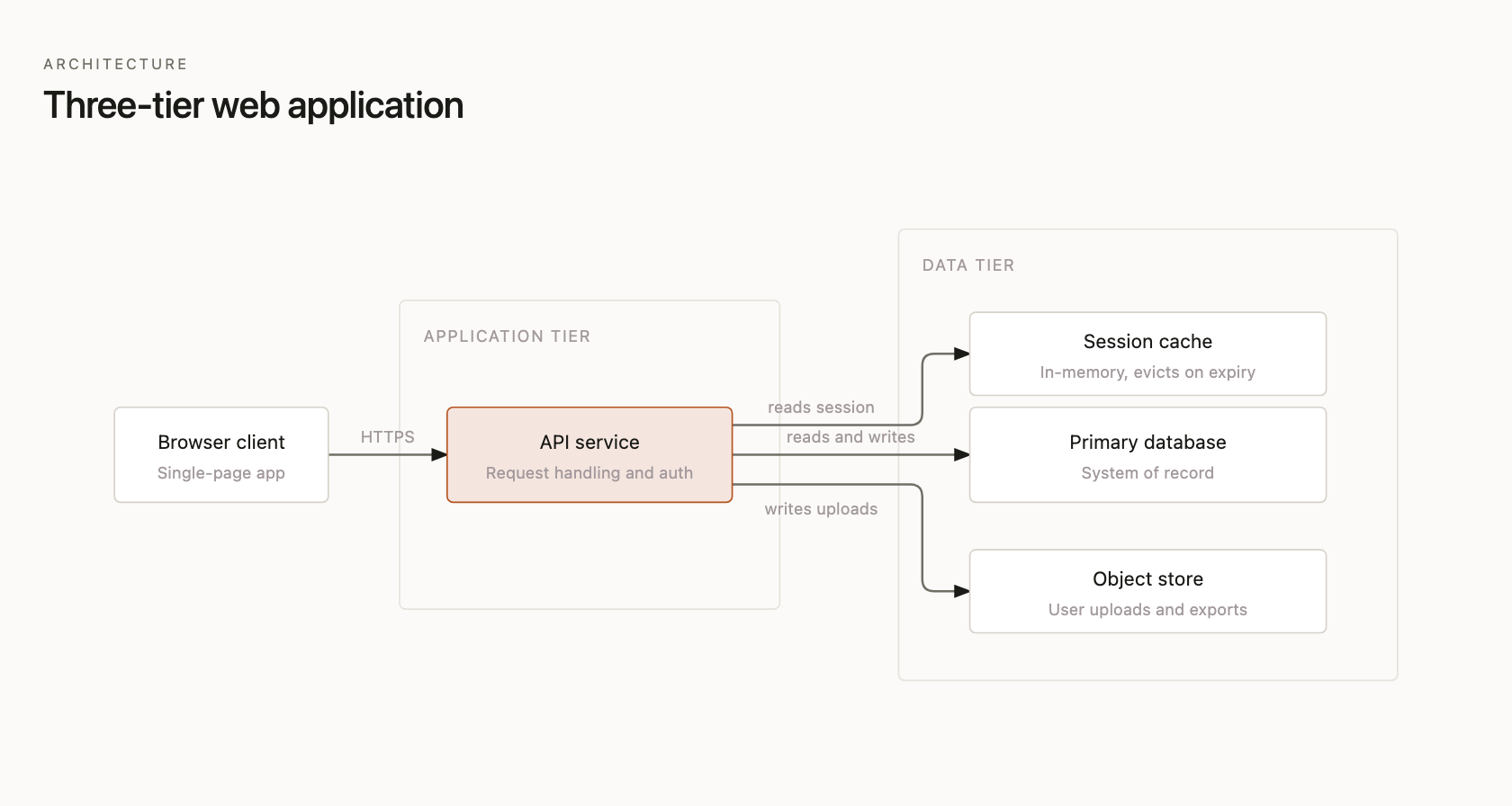
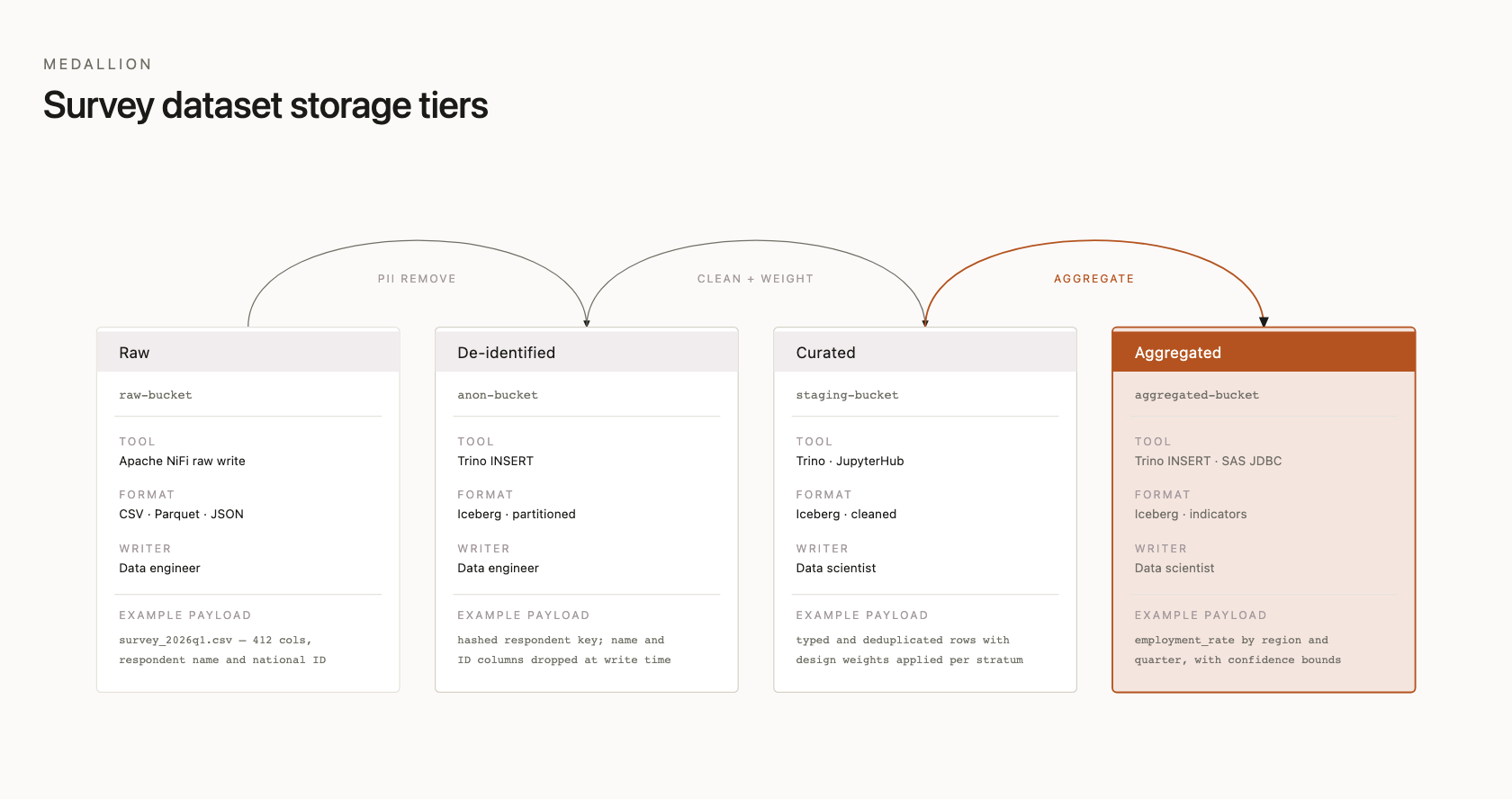
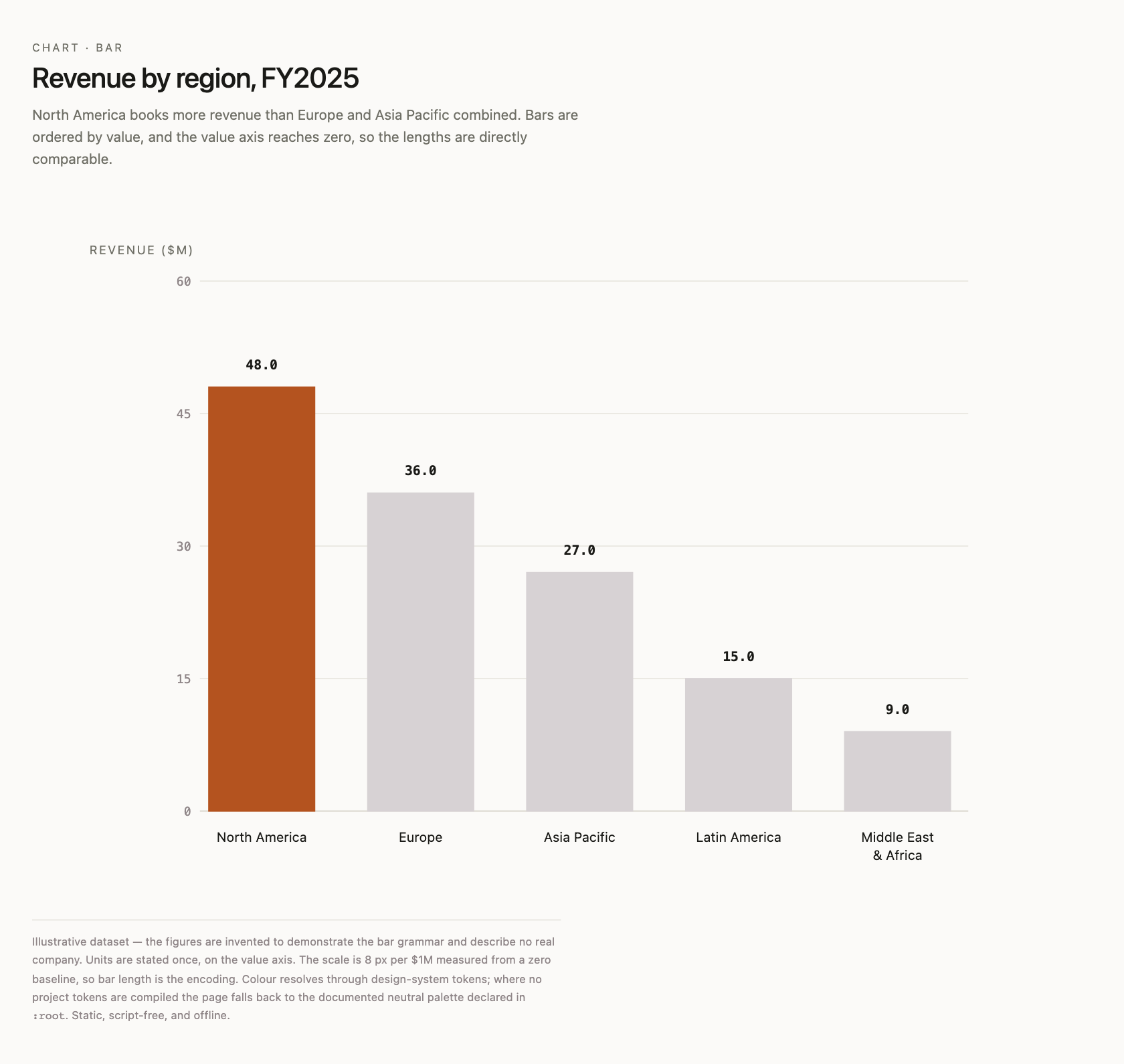
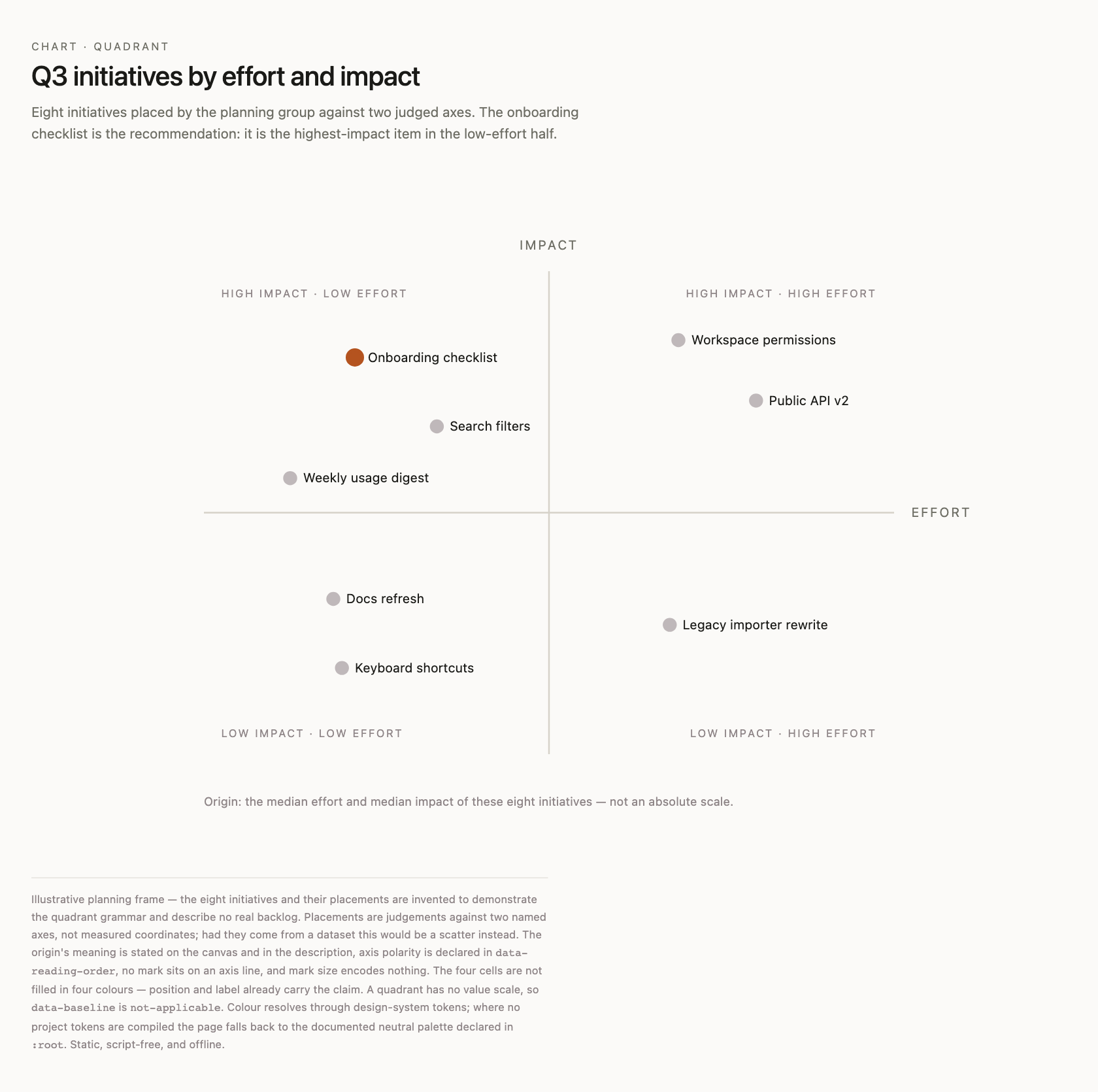
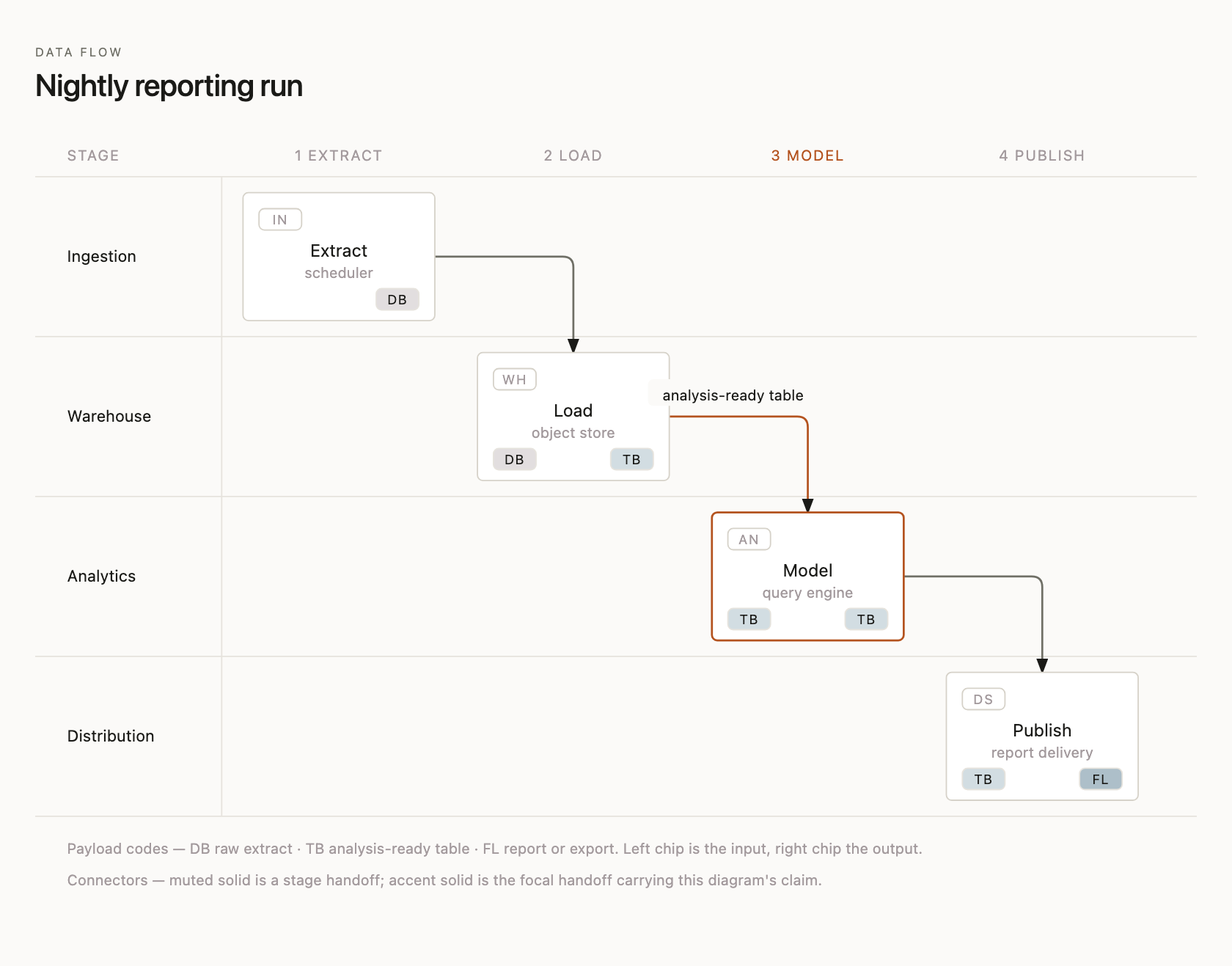
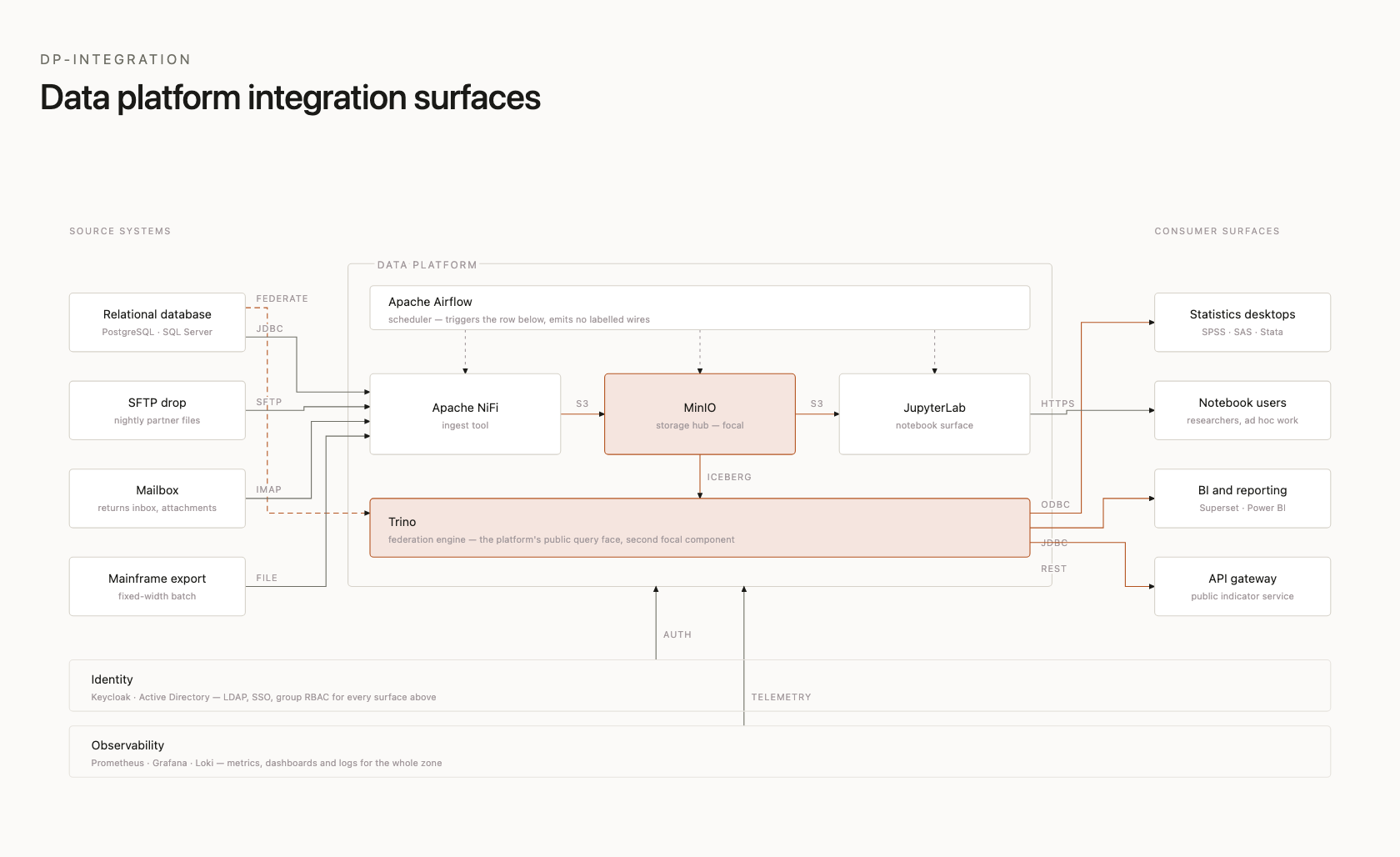
Diagrams and charts built with the CLI. Each one is a committed artifact that passes its linter with zero findings.
Limits
- The CLI compiles, checks and seals. It never calls a model, installs dependencies or fetches a Figma library. The agent is your own coding agent.
ui agents initrenders one roster for Claude Code, Codex and Antigravity;ui init --with-agentswrites the Claude Code agents only.- The Figma path needs a scan from Bridge. The CSS path reads custom properties only.
- A capture is only as complete as its source. A partial capture stays partial; the kit gates refuse to mark it complete.
ui gateandui ds a11yare floors, not conformance claims.
Watch
Talks on the Autonomous Design Agent from the design:os by Jang channel (Vietnamese, with English terms):
- Xây dựng autonomous design agent cho doanh nghiệp? how? (7:06): How the DESIGN:OS CLI, plugin bridge and deterministic gates turn an ontology into an autonomous design agent for enterprise design systems. Vietnamese, with English terms.
- Ontology là gì? apply vào build AI design agent như thế nào? (7:33): What an ontology is and how it grounds an AI design agent: shared vocabulary, semantic RAG and reusable design decisions. Vietnamese, with English terms.
- Autonomous Design Agent · Tập 03: Model + Harness và 6 trụ cột DESIGN:OS (8:44): Agent = Model + Harness: the six pillars of DESIGN:OS (single source of truth, Ontology Graph RAG, dual-layer spec, 126 CI gates, 9-verb patch, watchers). Vietnamese, with English terms.
Autonomous Design Agent (ADA) short series, six short episodes (Vietnamese, with English terms; English-titled playlist: ADA (English), Vietnamese playlist: ADA · Tiếng Việt):
- Storybook + W3C DTCG Tokens: Hard Boundaries for Designers and AI Agents (3:10)
- Ontology Graph RAG: Why AI Picks the Wrong UI Component (3:02)
- Spec-Driven Development: Lock the Spec Before AI Writes Code (2:25)
- Harness 2.0: The Control Frame That Keeps AI Agents Out of Endless Loops (2:43)
- Two-way bridge: One Comment, the AI Fixes Design and Code (2:44)
- Watchers, a 2-Mac Cluster and PII Guard: Infrastructure for Long-Running AI Agents (2:06)
More: Autonomous Design Agent series.
DESIGN:OS
The CLI is one of the DESIGN:OS tools. The others: Studio, Bridge, 3D Blender, SVG Animation, Code2Flow, Knowledge Builder and more on jangtrinh.github.io.
Docs: jangtrinh.github.io/design-os · Changelog: CHANGELOG.md · Index for AI agents: llms.txt
Contributing and license
- CONTRIBUTING.md · CODE_OF_CONDUCT.md · SECURITY.md · PRIVACY.md
- PolyForm Shield 1.0.0. FREE to use and modify, including for paid client work; you may not resell it or build a competing product from it.
Listed on dalisoft/awesome-ai-coding, Skills Directory, Piebald-AI/awesome-gemini-cli and SkillsMP.
Built by Jang Trịnh, creative technologist and autonomous system architect. More projects, case studies and writing at jang.work.